Every problem in the chapter beside the book’s answer, a chapter at a time as you scroll.
Chapter 8: Statistics
154 problems · 35 figuresYour Turn 8.1 §8.1 source ↗
For each of the following situations, identify whether the sample is a simple random sample, a systematic random sample, a stratified random sample, a cluster random sample, or none of these.
The chairperson of the University Chess Club is trying to decide on a time for the club’s regular meetings, so she emails all of the members of the club to find their preferences.Answer
Your Turn 8.1 (b) §8.1 source ↗
For each of the following situations, identify whether the sample is a simple random sample, a systematic random sample, a stratified random sample, a cluster random sample, or none of these.
The registrar at a small college wants to use a survey to determine if their office could do a better job of serving students. They choose three students at random from each major to take the survey.Answer
Your Turn 8.1 (c) §8.1 source ↗
For each of the following situations, identify whether the sample is a simple random sample, a systematic random sample, a stratified random sample, a cluster random sample, or none of these.
A civic club is organizing a raffle as a fundraiser. To determine the three winners, each of the tickets is put into a large drum, then the tickets are thoroughly mixed. A blindfolded club member pulls three tickets out of the drum.Answer
Your Turn 8.2 §8.1 source ↗
| Undecided | Biology | Biology | Sociology |
| Political Science | Sociology | Undecided | Undecided |
| Undecided | Biology | Biology | Education |
| Biology | Biology | Political Science | Political Science |
Answer
A categorical frequency distribution is a table with two columns. The first column contains all the categories present in the data, each listed once. The second column contains the frequencies of each category.
Make a table with a header that describes your categories and labels for each row. The second column is labeled “Frequency.” Check your work by making sure the sum of the second column is correct.
| Major | Frequency |
|---|---|
| Biology | 6 |
| Education | 1 |
| Political science | 3 |
| Sociology | 2 |
| Undecided | 4 |
Check the sum: 6 + 1 + 3 + 2 + 4 = 16
| Major | Frequency |
|---|---|
| Biology | 6 |
| Education | 1 |
| Political Science | 3 |
| Sociology | 2 |
| Undecided | 4 |
Your Turn 8.3 §8.1 source ↗
| 1 | 3 | 2 | 2 | 1 | 3 | 3 | 4 | 2 | 2 | 2 | 4 | 1 | 1 | 2 | 3 | 1 | 1 | 5 | 2 |
| 1 | 4 | 3 | 2 | 1 | 2 | 2 | 1 | 3 | 1 | 3 | 3 | 4 | 1 | 4 | 2 | 2 | 2 | 1 | 4 |
Answer
A categorical frequency distribution is a table with two columns. The first column contains all the categories present in the data, each listed once. The second column contains the frequencies of each category.
Make a table with a header that describes your categories and labels for each row. The second column is labeled “Frequency.” Check your work by making sure the sum of the second column is correct.
| Number of People in the Residence | Frequency |
|---|---|
| 1 | 12 |
| 2 | 13 |
| 3 | 8 |
| 4 | 6 |
| 5 | 1 |
Check the sum: 12 + 13 + 8 + 6 + 1 = 40
| Number of people in the residence | Frequency |
|---|---|
| 1 | 12 |
| 2 | 13 |
| 3 | 8 |
| 4 | 6 |
| 5 | 1 |
Your Turn 8.4 §8.1 source ↗
| 56 | 39 | 35 | 32 | 26 | 53 | 55 | 47 | 70 | 43 |
| 33 | 33 | 43 | 41 | 26 | 40 | 31 | 34 | 33 | 53 |
Answer
Step 1: Identify the maximum and minimum values in your bins.
The max: 70
The min: 26
Step 2: Determine the bin widths. Aim for seven or eight bins. You can use a formula to determine the bin width:
Step 3: Consider the context of the values. Since these are ages, round this to 5 to get a bin width of 5 years.
Step 4: Create the distribution table by filling in the bins. Notice that the last bin does not follow the pattern since it is made a bit larger to include the last value.
| Age Range | Frequency |
|---|---|
| 25 to 29 | |
| 30 to 34 | |
| 35 to 39 | |
| 40 to 44 | |
| 45 to 49 | |
| 50 to 54 | |
| 55 to 59 | |
| 60 to 64 | |
| 65 to 70 |
Step 5: Fill in the frequencies.
| Age Range | Frequency |
|---|---|
| 25 to 29 | 2 |
| 30 to 34 | 6 |
| 35 to 39 | 2 |
| 40 to 44 | 4 |
| 45 to 49 | 1 |
| 50 to 54 | 2 |
| 55 to 59 | 2 |
| 60 to 64 | 0 |
| 65 to 70 | 1 |
Step 6: Check your work. 2 + 6 + 2 + 4 + 1 + 2 + 2 + 0 + 1 = 20
| Age range | Frequency |
|---|---|
| 25-29 | 2 |
| 30-34 | 6 |
| 35-39 | 2 |
| 40-44 | 4 |
| 45-49 | 1 |
| 50-54 | 2 |
| 55-59 | 2 |
| 60-64 | 0 |
| 65-70 | 1 |
(Answers may vary depending on bin boundary decisions)
Check Your Understanding 8.1.1 §8.1 source ↗
For the following problems, decide whether randomization is being used in the selection of these samples. If it is, identify the type of random sample (simple, systematic, cluster, or stratified).
High school guidance counselors want to know the proportion of the school’s seniors who intend to apply for college. They choose four senior homerooms at random, then visit each one and ask every student in those homerooms whether they intend to apply.Answer
Check Your Understanding 8.1.2 §8.1 source ↗
For the following problems, decide whether randomization is being used in the selection of these samples. If it is, identify the type of random sample (simple, systematic, cluster, or stratified).
A quality control technician wants to ensure that the sandals being made in his factory are up to specifications, so they check the first five pairs they see coming off the line.Answer
Check Your Understanding 8.1.3 §8.1 source ↗
For the following problems, decide whether randomization is being used in the selection of these samples. If it is, identify the type of random sample (simple, systematic, cluster, or stratified).
A college athletic department wants to check up on the mental wellness of its student-athletes. The department wants to ensure every varsity sport is represented, so they survey three randomly selected members of each team.Answer
Check Your Understanding 8.1.4 §8.1 source ↗
The purchasing manager for a chain of bookstores wants to make sure they’re buying the right types of books to put on the shelves, so they take a sample of 20 books that customers bought in the last five days and record the genres. Use the raw data below to create a categorical frequency distribution.
| Nonfiction | Young Adult | Romance | Cooking | Young Adult |
| Young Adult | Thriller | Young Adult | Nonfiction | True Crime |
| Romance | Nonfiction | Thriller | True Crime | Romance |
| True Crime | Thriller | Romance | Young Adult | Young Adult |
Answer
A categorical frequency distribution is a table with two columns. The first column contains all the categories present in the data, each listed once. The second column contains the frequencies of each category.
Make a table with a header that describes your categories and labels for each row. The second column is labeled “Frequency.” Check your work by making sure the sum of the second column is correct.
| Genre | Frequency |
|---|---|
| Cooking | 1 |
| Non-fiction | 3 |
| Romance | 4 |
| Thriller | 3 |
| True Crime | 3 |
| Young Adult | 6 |
Check the sum: 1 + 3 + 4 + 3 + 3 + 6 = 20, which is correct.
| Genre | Frequency |
|---|---|
| Cooking | 1 |
| Non-fiction | 3 |
| Romance | 4 |
| Thriller | 3 |
| True Crime | 3 |
| Young Adult | 6 |
Check Your Understanding 8.1.5 §8.1 source ↗
| 3 | 4 | 4 | 3 | 5 | 4 | 4 | 3 | 2 | 3 | 5 | 5 | 3 | 3 | 4 | 3 |
| 2 | 4 | 3 | 3 | 4 | 3 | 5 | 3 | 3 | 3 | 2 | 3 | 1 | 3 | 4 | 3 |
Answer
Step 1: Count the number of times you see each response.
Step 2: Make a table with two columns. The first column should be labeled so that the reader knows what each response means. The second should be labeled “Frequency.” Then fill in the results of the count.
| Number of Classes | Frequency |
|---|---|
| 1 | 1 |
| 2 | 3 |
| 3 | 16 |
| 4 | 8 |
| 5 | 4 |
Step 3. Check your work. If you add up the counts, it should be the same number as the total number of responses.
1 + 3 + 16 + 8 + 4 = 32
| Number of classes | Frequency |
|---|---|
| 1 | 1 |
| 2 | 3 |
| 3 | 16 |
| 4 | 8 |
| 5 | 4 |
Check Your Understanding 8.1.6 §8.1 source ↗
| Country | Cell | Country | Cell |
|---|---|---|---|
| Cameroon | 83.7 | Benin | 78.5 |
| Vanuatu | 82.5 | Eritrea | 13.7 |
| Georgia | 140.7 | Mauritania | 92.2 |
| Kazakhstan | 146.6 | Czech Republic | 119 |
| Bermuda | 105.9 | Qatar | 151.1 |
| Russia | 157.9 | Pakistan | 73.4 |
| Hungary | 113.5 | Egypt | 105.5 |
| Costa Rica | 180.2 | Nepal | 123.2 |
| Algeria | 111 | Turkey | 96.4 |
| Somalia | 48.3 | Congo | 43.5 |
| Fiji | 114.2 | Venezuela | 78.5 |
| El Salvador | 156.5 | Germany | 133.6 |
| Angola | 44.7 |
Answer
| Range of Cell Phone Subscriptions Per Hundred People | Frequency |
|---|---|
| 0.0 – 24.9 | 1 |
| 25.0 – 49.9 | 3 |
| 50.0 – 74.9 | 1 |
| 75.0 – 99.9 | 6 |
| 100.0 – 124.9 | 7 |
| 125.0 – 149.9 | 3 |
| 150.0 – 174.9 | 3 |
| 175.0 – 199.9 | 1 |
(Note: Answers may vary based on choices made about bins.)
Your Turn 8.5 §8.2 source ↗
| Undecided | Biology | Biology | Sociology |
| Political Science | Sociology | Undecided | Undecided |
| Undecided | Biology | Biology | Education |
| Biology | Biology | Political Science | Political Science |
| Major | Frequency |
|---|---|
| Biology | 6 |
| Education | 1 |
| Political Science | 3 |
| Sociology | 2 |
| Undecided | 4 |
Answer
| Major | Frequency | Proportion |
|---|---|---|
| Biology | 6 | 37.5% |
| Education | 1 | 6.3% |
| Political Science | 3 | 18.8% |
| Sociology | 2 | 12.5% |
| Undecided | 4 | 25% |
Step 1: To compute a proportion, you need the frequency which you have in the table, and the total number of units that are represented in the data.
| Major | Frequency |
|---|---|
| Biology | 6 |
| Education | 1 |
| Political Science | 3 |
| Sociology | 2 |
| Undecided | 4 |
Add the frequencies: 6 + 1 + 3 + 2 + 4 = 16
Step 2: To find the proportions, divide the frequency by the total.
| Major | Frequency | Proportion |
|---|---|---|
| Biology | 6 | |
| Education | 1 | |
| Political Science | 3 | |
| Sociology | 2 | |
| Undecided | 4 |
Step 3: Add up your proportions. You should get 100%.
37.5% + 6.25% + 18.75% + 12.5% + 25% = 100%
Your Turn 8.6 §8.2 source ↗
| Major | Frequency | Proportion |
|---|---|---|
| Biology | 6 | 37.5% |
| Education | 1 | 6.3% |
| Political Science | 3 | 18.8% |
| Sociology | 2 | 12.5% |
| Undecided | 4 | 25% |
Answer
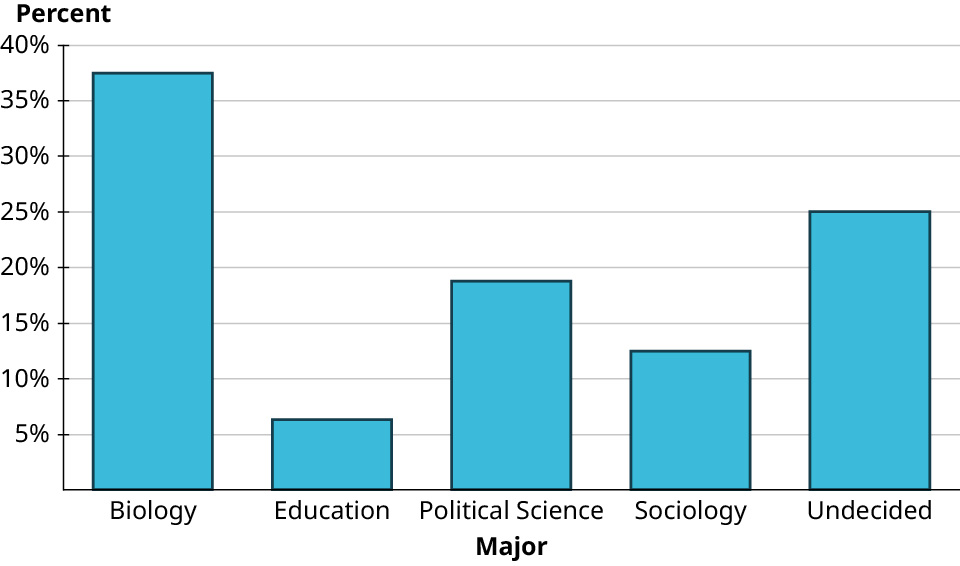
A bar chart consists of a series of rectangles arranged side-by-side (but not touching). Each rectangle corresponds to one of the categories. All the rectangles have the same width. The height of each rectangle corresponds to either the number of units in the corresponding category or the proportion of the total units that fall into the category.
Step 1: Draw the axes with the origin at the bottom left.
Step 2: Next, place your categories evenly spaced along the bottom of the horizontal axis. The order does not matter. If they have some natural order, maintain that order. Label the horizontal axis.
You will have your five majors, along with the label “Majors.”
Step 3: Decide how to define the height of the rectangles, the frequency itself or the proportion. Mark the vertical axis with units appropriate to your choice.
Use “Percent” for your vertical axis. Label your tick marks every 5% up to a maximum of 40%.
Step 4: Draw in the rectangles. Place a horizontal mark above the labels at the height appropriate for each category.
Use the table to mark the height of your five bars.
Step 5: Draw vertical lines straight down from the edges of your mark to make a rectangle.
Step 6: Build the rest of the rectangles, making sure they all have the same width. If a category has a percentage of 0, leave a space. Do not let the rectangles touch.
Your Turn 8.7 §8.2 source ↗
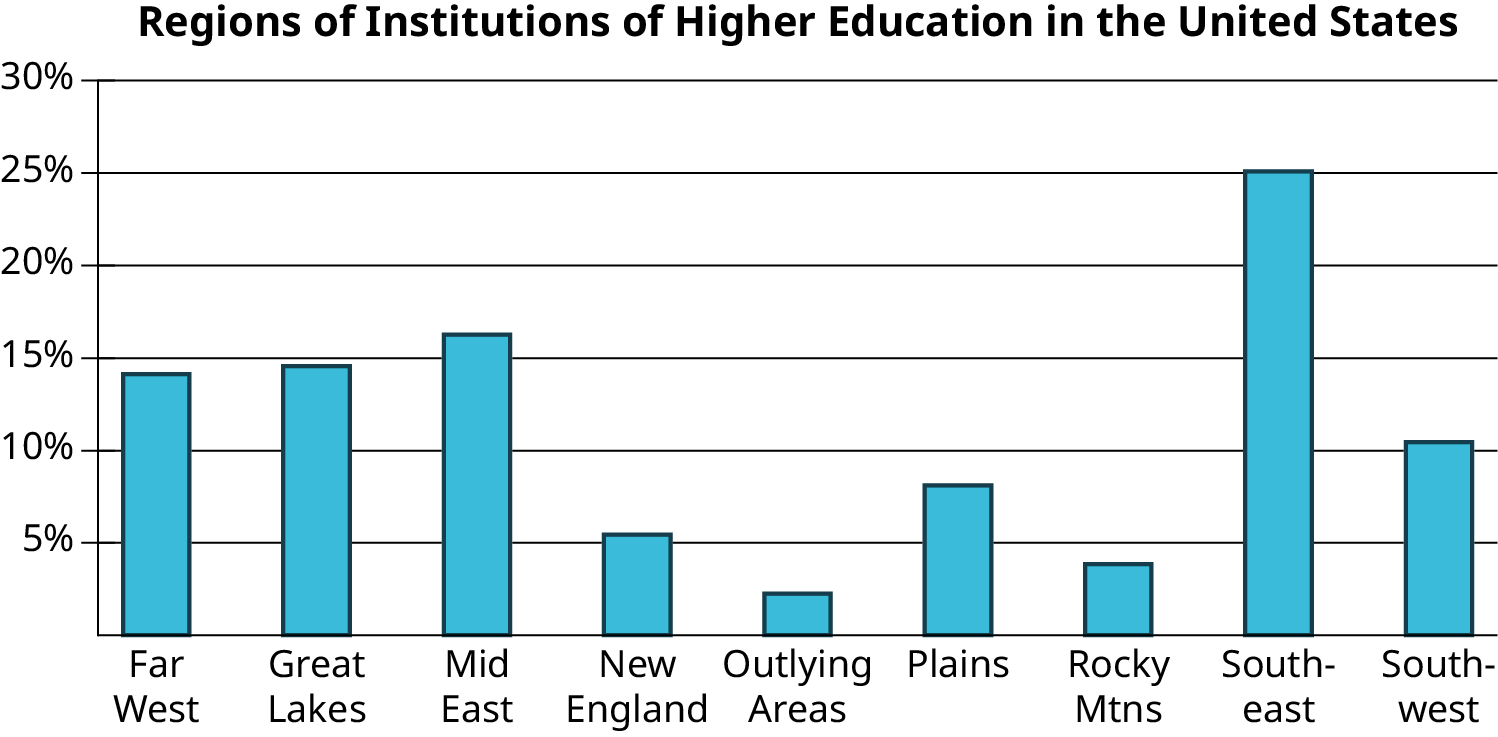
Analyze the bar chart to answer the following questions. Which region contains the largest number of institutions of higher learning?
Answer
Your Turn 8.7 (b) §8.2 source ↗
Analyze the bar chart to answer the following questions. What proportion of all institutions of higher learning can be found in the Southwest?
Answer
Your Turn 8.7 (c) §8.2 source ↗
Analyze the bar chart to answer the following questions. Which regions each have under 5% of the total number of institutions of higher learning?
Answer
Your Turn 8.8 §8.2 source ↗
| Major | Proportion |
|---|---|
| Biology | 37.5% |
| Undecided | 25.0% |
| Political Science | 18.8% |
| Sociology | 12.5% |
| Education | 6.3% |
Answer
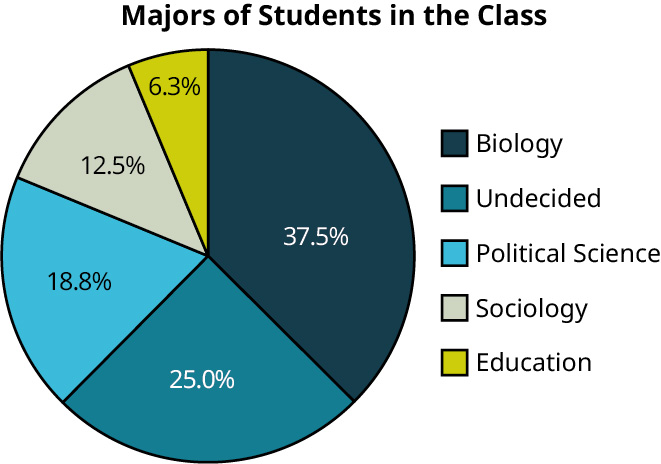
A pie chart consists of a circle divided into wedges, with each edge corresponding to a category. The proportion of the area of the entire circle that each wedge represents corresponds to the proportion of the data in that category. First, enter your data table into a new Google Sheet. Next, click and drag to select the full table, including the header row. Click on the “Insert” menu, then select “Chart.” The result may be a pie chart by default. If it is not, you can change it to a pie chart using the “Chart type” drop-down menu in the Chart editor.
| Major | Proportion |
|---|---|
| Biology | 37.5% |
| Education | 6.25% |
| Political Science | 18.75% |
| Sociology | 12.5% |
| Undecided | 25% |
Your pie chart may look a bit different than the one in the solution and that’s fine. Just be sure that the relative size of the wedges is the same and that you have labels on your pie “slices.”
Your Turn 8.9 §8.2 source ↗
| 0 | 4 6 7 |
| 1 | 0 0 0 2 2 2 4 5 8 8 |
| 2 | 0 5 5 5 |
| 3 | 0 0 5 5 6 |
| 4 | |
| 5 | 0 |
| 6 | 0 |
Answer
Stem-and-leaf plots are visualization tools that consist of a list of stems on the left and corresponding leaves on the right, separated by a line. The stems are the numbers that make up the data only up to the next-to-the last digit, and the leaves are the final digits. There is one leaf for every data value (which means that leaves may be repeated).
The leaves are the numbers to the right side of the line. There are 24 leaves.
Twenty-fourYour Turn 8.9 (b) §8.2 source ↗
| 0 | 4 6 7 |
| 1 | 0 0 0 2 2 2 4 5 8 8 |
| 2 | 0 5 5 5 |
| 3 | 0 0 5 5 6 |
| 4 | |
| 5 | 0 |
| 6 | 0 |
Answer
The three largest data values are 36, 50, and 60 miles.
The three smallest data values are 4, 6, and 7 miles.
The longest commutes are 60, 50, and 36 miles; the shortest are 4, 6, and 7 miles.Your Turn 8.9 (c) §8.2 source ↗
| 0 | 4 6 7 |
| 1 | 0 0 0 2 2 2 4 5 8 8 |
| 2 | 0 5 5 5 |
| 3 | 0 0 5 5 6 |
| 4 | |
| 5 | 0 |
| 6 | 0 |
Answer
Put together the stems (the numbers on the left side of the line) and leaves (the numbers on the right side of the line).
4, 6, 7, 10, 10, 10, 12, 12, 12, 14, 15, 18, 18, 20, 25, 25, 25, 30, 30, 35, 35, 36, 50, 60
4, 6, 7, 10, 10, 10, 12, 12, 12, 14, 15, 18, 18, 20, 25, 25, 25, 30, 30, 35, 35, 36, 50, 60Your Turn 8.10 §8.2 source ↗
| Team | Wins | Losses | Team | Wins | Losses |
|---|---|---|---|---|---|
| HOU | 107 | 55 | PHI | 81 | 81 |
| LAD | 106 | 56 | TEX | 78 | 84 |
| NYY | 103 | 59 | SFG | 77 | 85 |
| MIN | 101 | 61 | CIN | 75 | 87 |
| ATL | 97 | 65 | CHW | 72 | 89 |
| OAK | 97 | 65 | LAA | 72 | 90 |
| TBR | 96 | 66 | COL | 71 | 91 |
| CLE | 93 | 69 | SDP | 70 | 92 |
| WSN | 93 | 69 | PIT | 69 | 93 |
| STL | 91 | 71 | SEA | 68 | 94 |
| MIL | 89 | 73 | TOR | 67 | 95 |
| NYM | 86 | 76 | KCR | 59 | 103 |
| ARI | 85 | 77 | MIA | 57 | 105 |
| BOS | 84 | 78 | BAL | 54 | 108 |
| CHC | 84 | 78 | DET | 47 | 114 |
Answer
Stem-and-leaf plots are visualization tools that consist of a list of stems on the left and corresponding leaves on the right, separated by a line. The stems are the numbers that make up the data only up to the next-to-the last digit, and the leaves are the final digits. There is one leaf for every data value (which means that leaves may be repeated).
| 4 | 7 |
| 5 | 9 7 4 |
| 6 | 9 8 7 |
| 7 | 8 7 5 2 2 1 0 |
| 8 | 9 6 5 4 4 1 |
| 9 | 7 7 6 3 3 1 |
| 10 | 7 6 3 1 |
| 4 | 7 |
| 5 | 9 7 4 |
| 6 | 9 8 7 |
| 7 | 8 7 5 2 2 1 0 |
| 8 | 9 6 5 4 4 1 |
| 9 | 7 7 6 3 3 1 |
| 10 | 7 6 3 1 |
Your Turn 8.11 §8.2 source ↗
| Team | Wins | Losses |
|---|---|---|
| HOU | 107 | 55 |
| LAD | 106 | 56 |
| NYY | 103 | 59 |
| MIN | 101 | 61 |
| ATL | 97 | 65 |
| OAK | 97 | 65 |
| TBR | 96 | 66 |
| CLE | 93 | 69 |
| WSN | 93 | 69 |
| STL | 91 | 71 |
| MIL | 89 | 73 |
| NYM | 86 | 76 |
| ARI | 85 | 77 |
| BOS | 84 | 78 |
| CHC | 84 | 78 |
| PHI | 81 | 81 |
| TEX | 78 | 84 |
| SFG | 77 | 85 |
| CIN | 75 | 87 |
| CHW | 72 | 89 |
| LAA | 72 | 90 |
| COL | 71 | 91 |
| SDP | 70 | 92 |
| PIT | 69 | 93 |
| SEA | 68 | 94 |
| TOR | 67 | 95 |
| KCR | 59 | 103 |
| MIA | 57 | 105 |
| BAL | 54 | 108 |
| DET | 47 | 114 |
Answer
Step 1: Add data to bins.
Histograms are easy to make when the stem-and-leaf plot is already done.
| 4 | 7 |
| 5 | 9 7 4 |
| 6 | 9 8 7 |
| 7 | 8 7 5 2 2 1 0 |
| 8 | 9 6 5 4 4 1 |
| 9 | 7 7 6 3 3 1 |
| 10 | 7 6 3 1 |
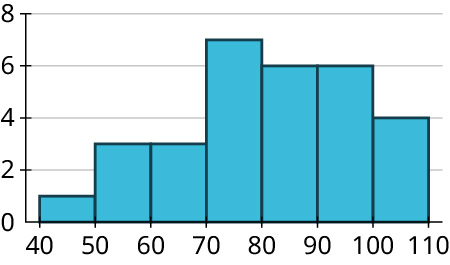
If using a bin-width of 10, you can compute the frequency by counting the number of leaves associated with the corresponding stem:
| Bin | Frequency |
|---|---|
| 40-49 | 1 |
| 50-59 | 3 |
| 60-69 | 3 |
| 70-79 | 7 |
| 80-89 | 6 |
| 90-99 | 6 |
| 100-109 | 4 |
Step 2. Create the axes.
On the horizontal axis, start labeling with the lower end of the first bin (in this case, 40), and go up to the higher end of the last bin (110). Mark off the other bin boundaries, making sure they are evenly spaced.
On the vertical axis, start with zero and go up to at least the highest frequency you see in your bins (7 in this example). You could go up to 8 and make labels and tick marks at 0, 2, 4, 6, and 8.
Step 3. Draw in the bars.
Remember that the bars of a histogram touch. The heights are determined by the frequency. The first bar will cover from 40 to 50 at a height of 1. The second bar will cover from 50 to 60 at a height of 3. Continue to draw bars using your bin and frequency table until you draw a bar from 100 to 110 at a height of 4.
To check your work, notice that if you turned your stem-and-leaf plot on its side, it would have the same general shape as your histogram.
Your Turn 8.12 §8.2 source ↗
Answer
Watch the video in the lesson.
Open a copy of the file from the lesson in Google Sheets.
See the InState tuition costs on the second tab.
Highlight ONLY column B and C (not all three columns).
In the top menu, choose “Insert” and then choose “Chart.”
It likely will suggest “Histogram” in “Chart type.” If not, change it to “Histogram.”
Select “Customize,” then select the “Histogram” options.
Bucket size: You can change “Auto” to anything you like. You will have to select a preset number first, but then you can type in a number such as 2,500.
To add axis labels, select “Chart and axis titles.”
In the drop down, select “Horizontal axis title” and enter “Tuition.”
In the drop down, select “Vertical axis title” and enter “Frequency,”
Once you have created your histogram, you can see that the data are strongly right skewed.
Answers may vary based on bin choices. Here’s the result for bins of width 2,500:
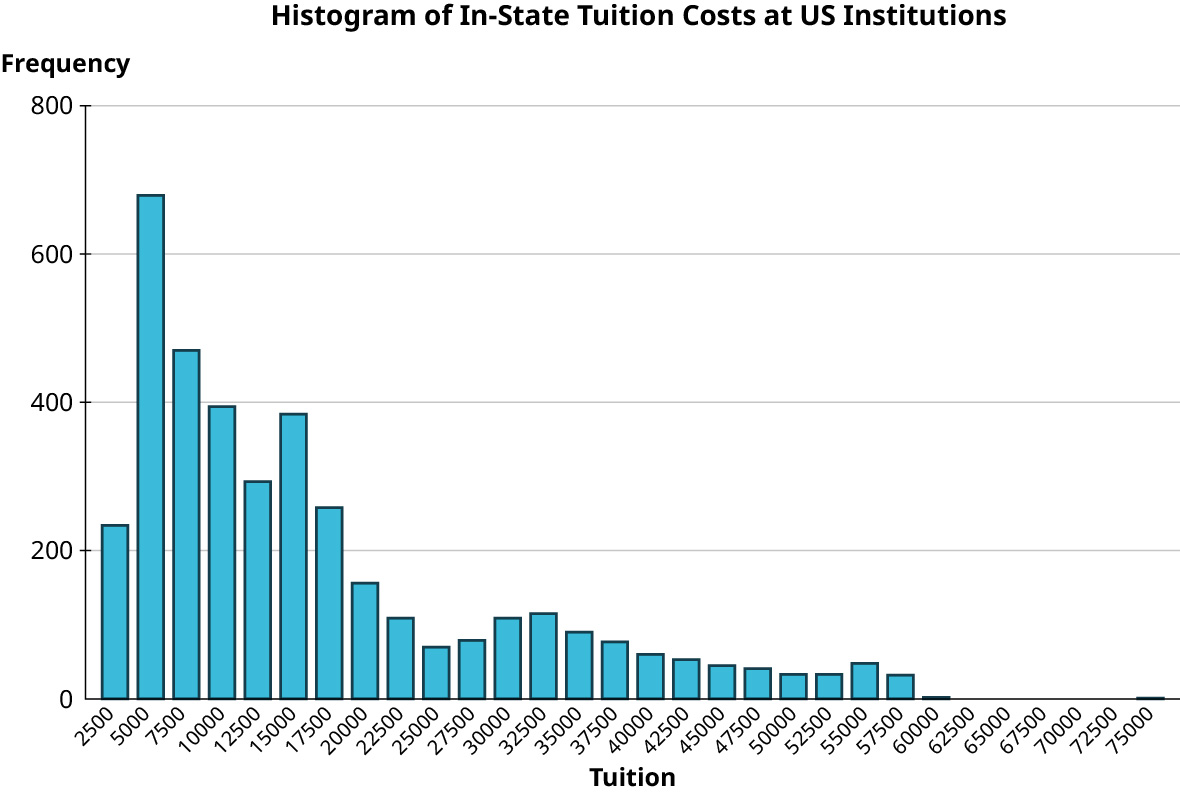
The data are strongly right-skewed.
Your Turn 8.13 §8.2 source ↗
| Event | Time | Name | Nationality |
|---|---|---|---|
| Freestyle | 51.71 | Sarah Sjöström | Sweden |
| Backstroke | 57.57 | Regan Smith | United States |
| Breaststroke | 64.10 | Lilly King | United States |
| Butterfly | 55.48 | Sarah Sjöström | Sweden |
Answer
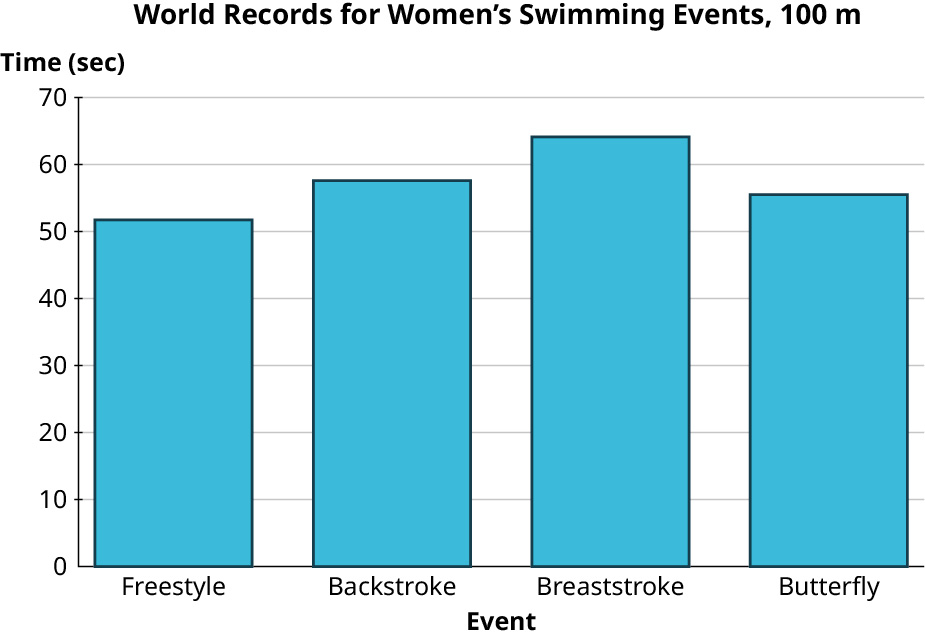
For this visualization, the events are the labels, and the times determine the heights of the bars. Enter the information from the first two columns into a Google Sheet spreadsheet, including the headers “Event” and “Time (sec),”
Highlight your entire table, including the headers.
Then in the “Insert” menu, choose “Chart.” If the result is not already “Column chart,” then change to “Column chart.”
Change over to the “Customize” menu. Use the “Chart and axis titles” option to make the following changes if they are not already the defaults:
Chart title: “World Records for Women’s Swimming Events, 100 m”
Horizontal axis: “Event”
Vertical axis: “Time (sec)”
Your Turn 8.14 §8.2 source ↗
| Team | Wins | Team | Wins |
|---|---|---|---|
| HOU | 107 | PHI | 81 |
| LAD | 106 | TEX | 78 |
| NYY | 103 | SFG | 77 |
| MIN | 101 | CIN | 75 |
| ATL | 97 | CHW | 72 |
| OAK | 97 | LAA | 72 |
| TBR | 96 | COL | 71 |
| CLE | 93 | SDP | 70 |
| WSN | 93 | PIT | 69 |
| STL | 91 | SEA | 68 |
| MIL | 89 | TOR | 67 |
| NYM | 86 | KCR | 59 |
| ARI | 85 | MIA | 57 |
| BOS | 84 | BAL | 54 |
| CHC | 84 | DET | 47 |
Answer
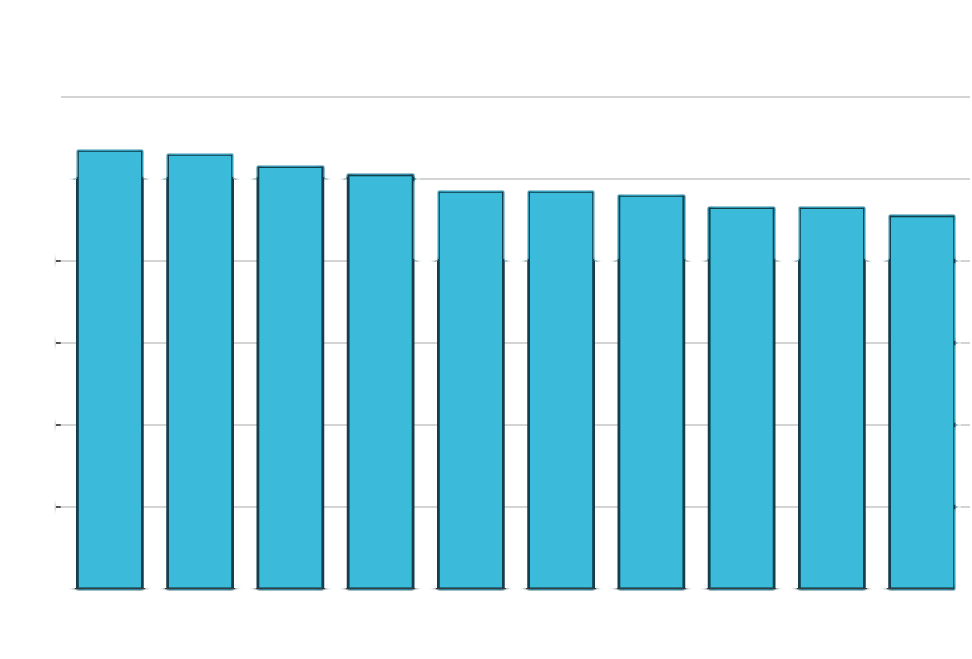
Top ten teams by wins:
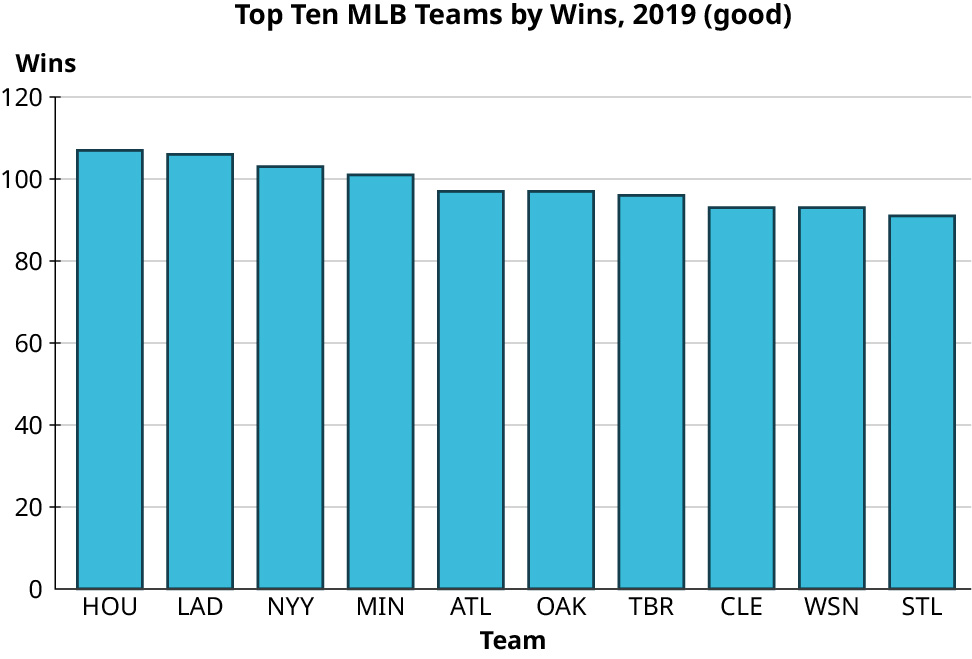
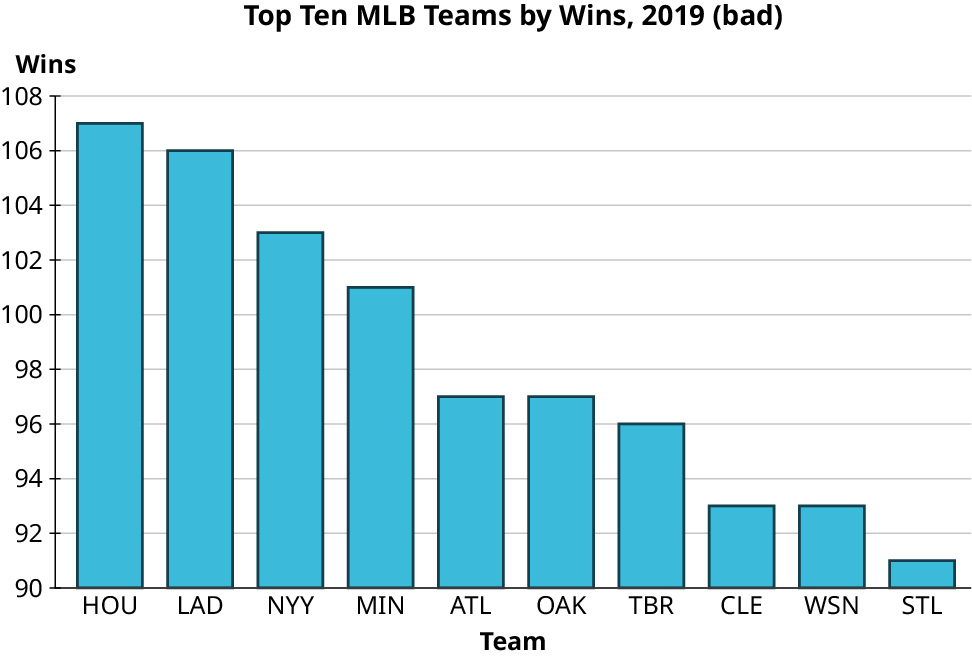
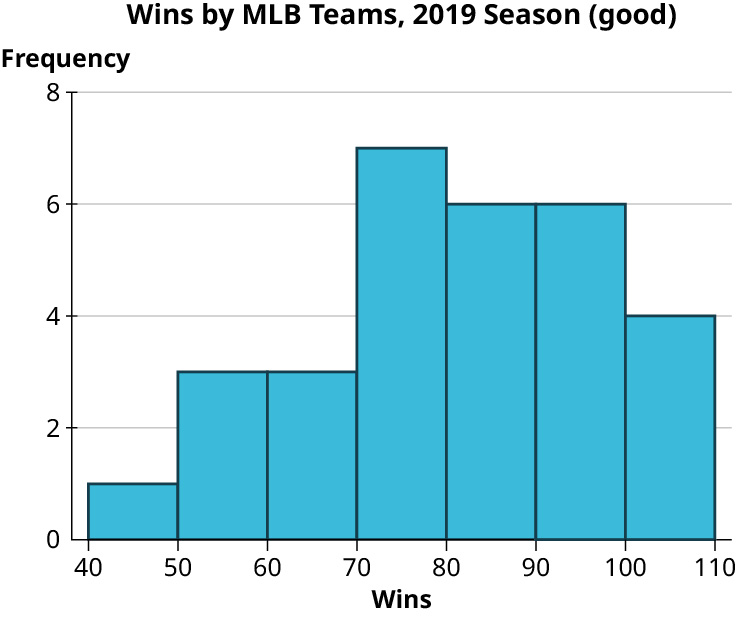
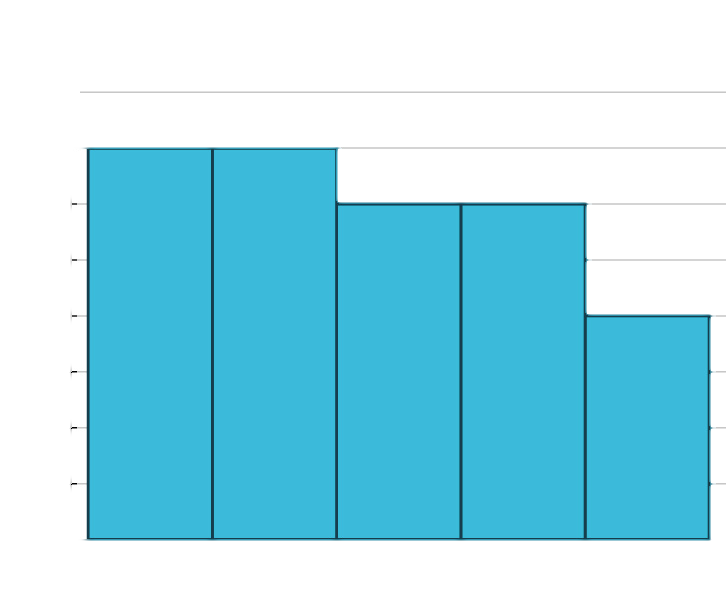
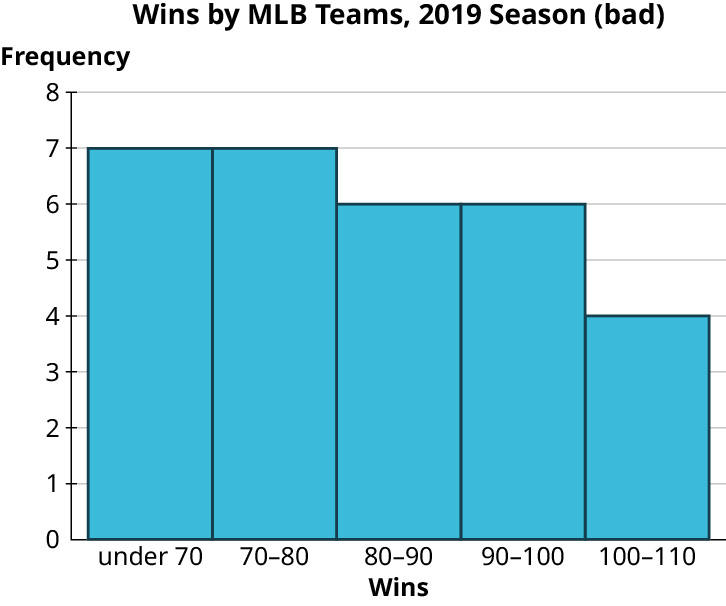
Check Your Understanding 8.2.7 §8.2 source ↗
| Mammal | Mammal | Reptile | Bird | Mammal | Amphibian |
| Mammal | Mammal | Mammal | Reptile | Mammal | Bird |
| Mammal | Bird | Reptile | Reptile | Amphibian | Mammal |
| Bird | Mammal | Amphibian | Mammal | Mammal | Bird |
Answer
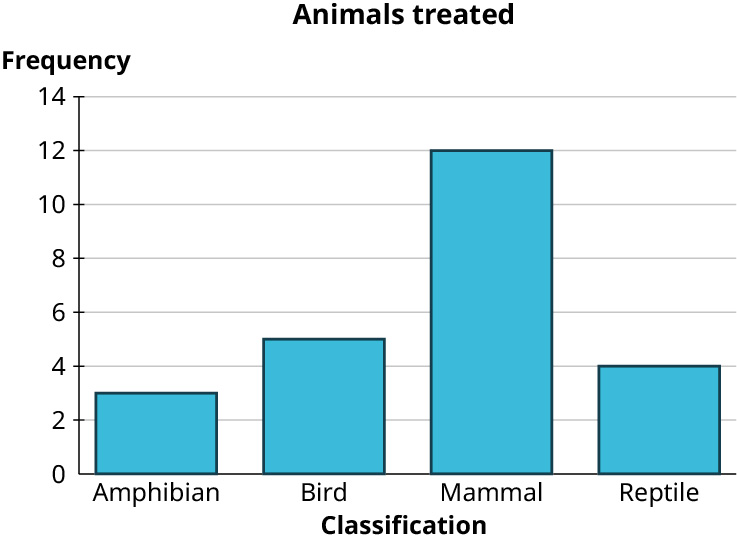
Step 1: First make a frequency table.
| Major | Frequency |
|---|---|
| Amphibian | 3 |
| Bird | 5 |
| Mammal | 12 |
| Reptile | 4 |
A bar chart consists of a series of rectangles arranged side-by-side (but not touching). Each rectangle corresponds to one of the categories. All the rectangles have the same width. The height of each rectangle corresponds to either the number of units in the corresponding category or the proportion of the total units that fall into the category. Make a bar chart using the frequency.
Step 1: Draw the axes with the origin at the bottom left.
Step 2: Next, place your categories evenly spaced along the bottom of the horizontal axis. Label the horizontal axis with the names of your categories.
Step 3: Decide how to define the height of the rectangles, the frequency itself or the proportion. Mark the vertical axis with units appropriate to your choice. We are using the frequency, so mark the vertical axis up to 14. Add labels and tick marks at 0, 2, 4, 6, 8, 10, 12, and 14.
Step 4: Draw in the rectangles. Place a horizontal mark above the labels at the height appropriate for each category.
Step 5: Draw vertical lines straight down from the edges of your mark to make a rectangle.
Step 6: Build the rest of the rectangles, making sure they all have the same width. Do not let the rectangles touch.
Check Your Understanding 8.2.8 §8.2 source ↗
| Mammal | Mammal | Reptile | Bird | Mammal | Amphibian |
| Mammal | Mammal | Mammal | Reptile | Mammal | Bird |
| Mammal | Bird | Reptile | Reptile | Amphibian | Mammal |
| Bird | Mammal | Amphibian | Mammal | Mammal | Bird |
Answer
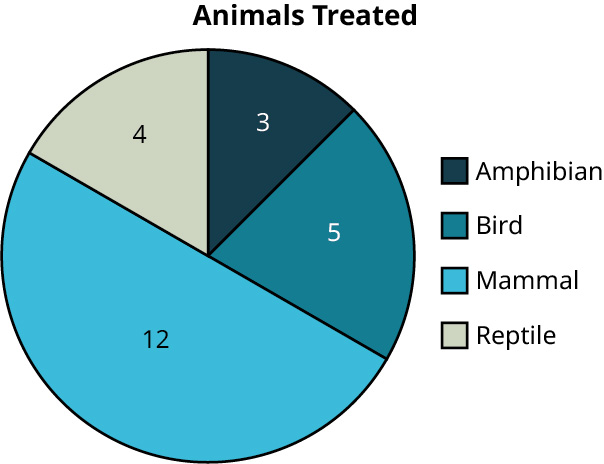
A pie chart consists of a circle divided into wedges, with each edge corresponding to a category. The proportion of the area of the entire circle that each wedge represents corresponds to the proportion of the data in that category. First, enter your table into a new Google Sheet. Next, click and drag to select the full table, including the header row. Click on the “Insert” menu, then select “Chart.” The result may be a pie chart by default. If it is not, you can change it to a pie chart using the “Chart type” drop-down menu in the Chart editor.
| Major | Frequency |
|---|---|
| Amphibian | 3 |
| Bird | 5 |
| Mammal | 12 |
| Reptile | 4 |
Your pie chart may look a bit different than the one in the solution and that’s fine. Just be sure that the relative size of the wedges is the same and that you have labels on your pie “slices.”
Check Your Understanding 8.2.9 §8.2 source ↗
| 142 | 153 | 158 | 156 | 141 | 143 |
| 139 | 158 | 156 | 146 | 137 | 153 |
| 136 | 127 | 157 | 148 | 132 | 139 |
| 155 | 167 | 143 | 168 | 133 | 157 |
| 138 | 156 | 164 | 130 | 148 | 136 |
Answer
| 12 | 7 |
| 13 | 0 2 3 6 6 7 8 9 9 |
| 14 | 1 2 3 3 6 8 8 |
| 15 | 3 3 5 6 6 6 7 7 8 8 |
| 16 | 4 7 8 |
Stem-and-leaf plots are visualization tools that consist of a list of stems on the left and corresponding leaves on the right, separated by a line. The stems are the numbers that make up the data only up to the next-to-the last digit, and the leaves are the final digits. There is one leaf for every data value (which means that leaves may be repeated).
| 12 | 7 |
| 13 | 9 6 8 0 7 2 3 9 6 |
| 14 | 2 3 6 8 1 8 3 |
| 15 | 5 3 8 6 8 6 7 6 3 7 |
| 16 | 7 4 8 |
Add the frequencies to check your work: 1 + 9 + 7 + 10 + 3 = 30
Check Your Understanding 8.2.10 §8.2 source ↗
| 142 | 153 | 158 | 156 | 141 | 143 |
| 139 | 158 | 156 | 146 | 137 | 153 |
| 136 | 127 | 157 | 148 | 132 | 139 |
| 155 | 167 | 143 | 168 | 133 | 157 |
| 138 | 156 | 164 | 130 | 148 | 136 |
Answer
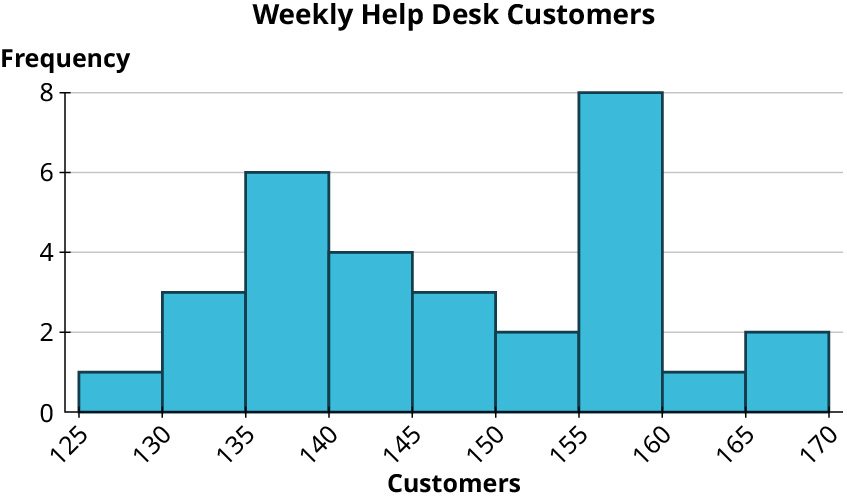
Step 1: Add data to bins.
Histograms are easy to make when the stem-and-leaf plot is already done. Since they want a bin-width of 5, let’s order the stem-and-leaf plot.
| 12 | 7 |
| 13 | 0 2 3 6 6 7 8 9 9 |
| 14 | 1 2 3 3 6 8 8 |
| 15 | 3 3 5 6 6 6 7 7 8 8 |
| 16 | 4 7 8 |
If using a bin-width of 5, you can compute the frequency by counting the number of leaves associated with the corresponding stem:
| Bin | Frequency |
|---|---|
| 125-129 | 1 |
| 130-134 | 3 |
| 135-139 | 6 |
| 140-144 | 4 |
| 145-149 | 3 |
| 150-154 | 2 |
| 155-159 | 8 |
| 160-164 | 1 |
| 165-169 | 2 |
Add the frequencies to check your work: 1 + 3 + 6 + 4 + 3 + 2 + 8 + 1 + 2 = 30
Step 2. Create the axes.
On the horizontal axis, start labeling with the lower end of the first bin (in this case, 125), and go up to the higher end of the last bin (170). Mark off the other bin boundaries, making sure they are evenly spaced.
On the vertical axis, start with zero and go up to at least the highest frequency you see in your bins (8 in this example). You could go up to 8 and make labels and tick marks at 2, 4, 6, and 8.
Step 3. Draw in the bars.
Remember that the bars of a histogram touch. The heights are determined by the frequency. The first bar will cover from 125 to 129 at a height of 1. The second bar will cover from 130 to 134 at a height of 3. Continue to draw bars using your bin and frequency table until you draw a bar from 165 to 170 at a height of 2.
Check Your Understanding 8.2.11 §8.2 source ↗
| Campus | Admission Rate | Cost ($) |
|---|---|---|
| Berkeley | 0.1484 | 43,176 |
| Davis | 0.4107 | 43,394 |
| Irvine | 0.2876 | 42,692 |
| Los Angeles | 0.1404 | 42,218 |
| Merced | 0.6617 | 42,530 |
| Riverside | 0.5057 | 42,819 |
| San Diego | 0.3006 | 43,159 |
| Santa Barbara | 0.322 | 43,383 |
| Santa Cruz | 0.4737 | 42,952 |
Answer
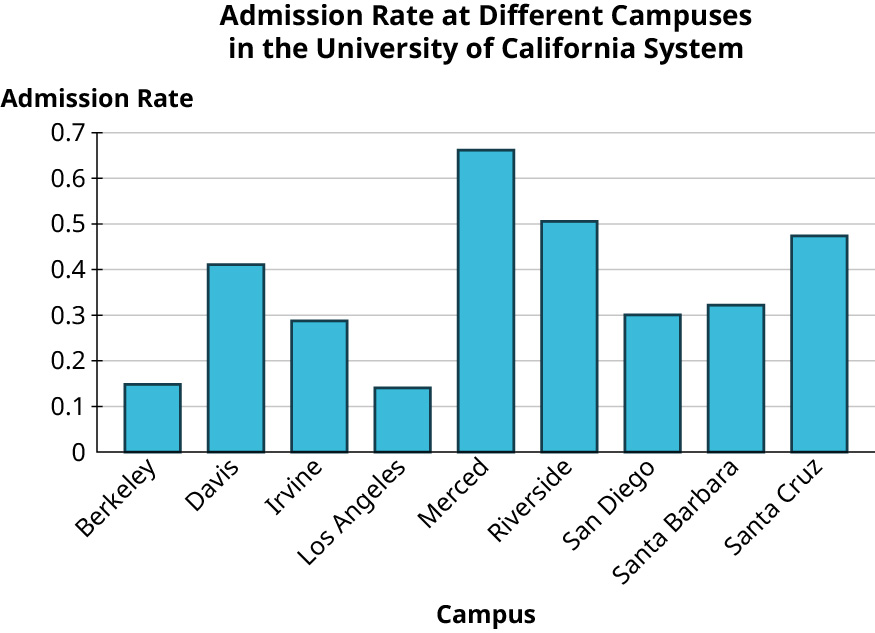
For this visualization, the campuses are the labels, and the admission rates determine the heights of the bars. Enter the information into a Google Sheet spreadsheet, including the headers “Campus” and “Admission Rate.” Then in the “Insert” menu, choose “Chart.” If the result is not already “Column chart,” then change to “Column chart.”
Change over to the “Customize” menu. Use the “Chart and axis titles” option to make the following changes if they are not already the defaults:
Chart title: “Admission Rate at Different Campuses in the University of California System”
Horizontal axis: “Campus”
Vertical axis: “Admission Rate”
 (data source:https://data.ed.gov/)
Check Your Understanding 8.2.12 §8.2 source ↗
| Campus | Admission Rate | Cost ($) |
|---|---|---|
| Berkeley | 0.1484 | 43,176 |
| Davis | 0.4107 | 43,394 |
| Irvine | 0.2876 | 42,692 |
| Los Angeles | 0.1404 | 42,218 |
| Merced | 0.6617 | 42,530 |
| Riverside | 0.5057 | 42,819 |
| San Diego | 0.3006 | 43,159 |
| Santa Barbara | 0.322 | 43,383 |
| Santa Cruz | 0.4737 | 42,952 |
Answer
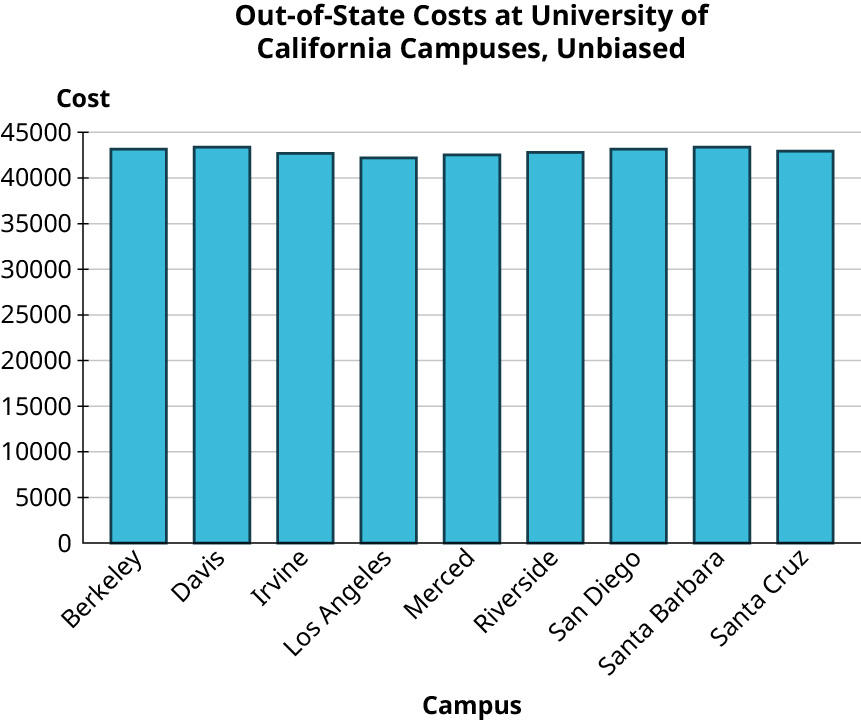
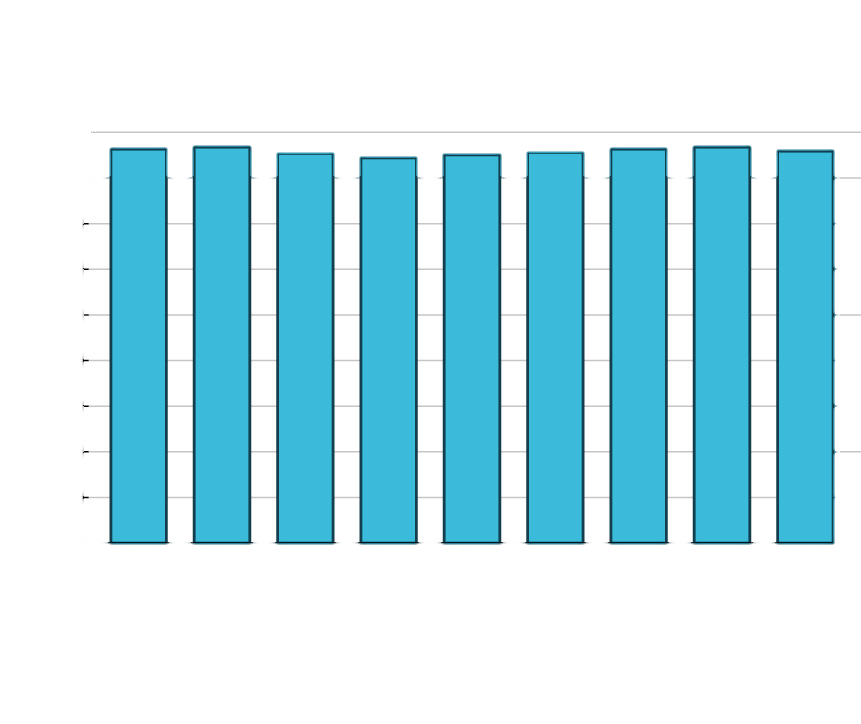 (data source: https://data.ed.gov/)
 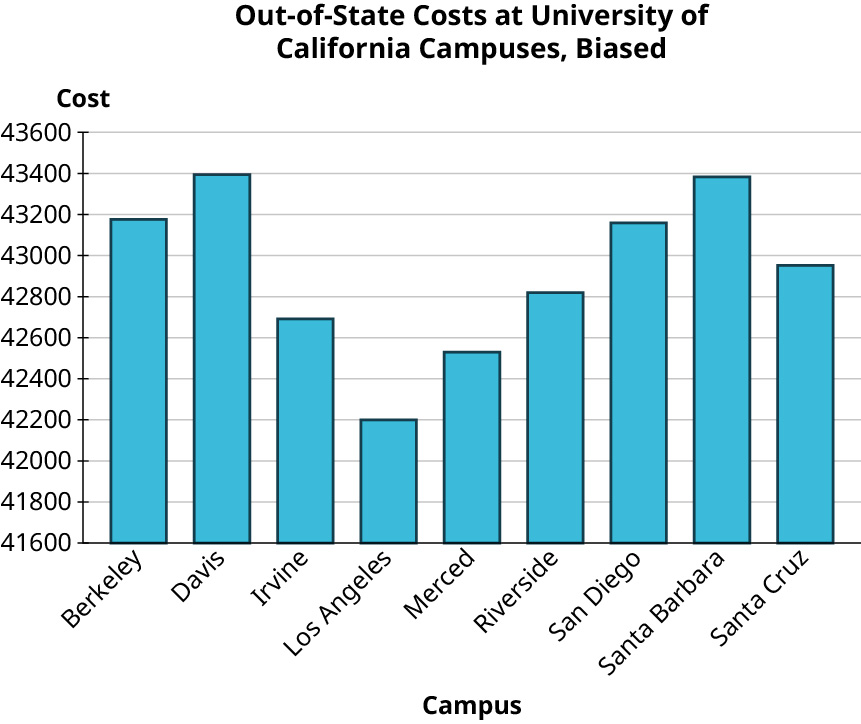 (data source: https://data.ed.gov/)
Your Turn 8.15 §8.3 source ↗
| 8 | 2 2 4 5 9 9 9 |
| 9 | 1 1 2 3 7 9 |
| 10 | 0 1 2 3 3 4 4 4 5 6 6 7 9 9 |
| 11 | 5 6 |
| 12 | 0 |
Answer
Your Turn 8.16 §8.3 source ↗
| Number of People in the Residence | Frequency |
|---|---|
| 1 | 12 |
| 2 | 13 |
| 3 | 8 |
| 4 | 6 |
| 5 | 1 |
Answer
2
Your Turn 8.17 §8.3 source ↗
| 12 | 1 2 2 5 |
| 13 | 0 3 4 4 6 8 |
| 14 | 2 5 9 9 |
| 15 | 0 3 |
| 16 | |
| 17 | 0 |
Answer
Suppose you have a set of data with n values, ordered from the smallest to the largest. If n is odd, the median is the data value at position . If n is even, then add the values at the and positions, then divide by 2 to find the median.
Since there are 17 data values, use the odd method.
The 9th data value is 136.
The median is 136.
136Your Turn 8.18 §8.3 source ↗
| Team | Wins | Losses | Team | Wins | Losses |
|---|---|---|---|---|---|
| HOU | 107 | 55 | PHI | 81 | 81 |
| LAD | 106 | 56 | TEX | 78 | 84 |
| NYY | 103 | 59 | SFG | 77 | 85 |
| MIN | 101 | 61 | CIN | 75 | 87 |
| ATL | 97 | 65 | CHW | 72 | 89 |
| OAK | 97 | 65 | LAA | 72 | 90 |
| TBR | 96 | 66 | COL | 71 | 91 |
| CLE | 93 | 69 | SDP | 70 | 92 |
| WSN | 93 | 69 | PIT | 69 | 93 |
| STL | 91 | 71 | SEA | 68 | 94 |
| MIL | 89 | 73 | TOR | 67 | 95 |
| NYM | 86 | 76 | KCR | 59 | 103 |
| ARI | 85 | 77 | MIA | 57 | 105 |
| BOS | 84 | 78 | BAL | 54 | 108 |
| CHC | 84 | 78 | DET | 47 | 114 |
Answer
The table lists the wins in order from largest to smallest. There are 30 data values.
Suppose you have a set of data with n values, ordered from the smallest to the largest. If n is odd, the median is the data value at position . If n is even, then add the values at the and positions, then divide by 2 to find the median.
Since there are 30 data values, use the even method.
and = 16
The 15th value is 81 and the 16th value is 84.
Add them up and divide by 2: = 82.5
The median is 82.5.
82.5Your Turn 8.19 §8.3 source ↗
| Number of People in the Residence | Frequency |
|---|---|
| 1 | 12 |
| 2 | 13 |
| 3 | 8 |
| 4 | 6 |
| 5 | 1 |
Answer
Find the total number of data values. 12 + 13 + 8 + 6 + 1 = 40
If n is even, then add the values at the and positions, then divide by 2 to find the median.
Since there are 30 data values, use the even method.
and = 21
To help you find the 20th and 21st persons, you can add a Cumulative Frequency column to the table. You can stop when you get to the 21st person; you don’t have to finish the table.
| Number of People in Residence | Frequency | Cumulative Frequency |
|---|---|---|
| 1 | 12 | 12 |
| 2 | 13 | 12 + 13 = 25 You know the 20th and 21st people are in this group! |
The 20th and 21st people live with 2 people in the residence.
Add them up and divide by 2:
The median is 2.
2Your Turn 8.20 §8.3 source ↗
Answer
The mean is the sum of the values, divided by the number of values.
The mean is 15.556.
12.556Your Turn 8.21 §8.3 source ↗
| Number of People in the Residence | Frequency |
|---|---|
| 1 | 12 |
| 2 | 13 |
| 3 | 8 |
Answer
You can use the table to help do your math.
| Number of People in Residence | Frequency | People Times Frequency |
|---|---|---|
| 1 | 12 | 12 |
| 2 | 13 | 26 |
| 3 | 8 | 24 |
| SUMS: | 33 | 62 |
| Mean (Divide Sums) | 62 ÷ 33 ≈ 1.879 |
The mean is approximately 1.879.
Your Turn 8.22 §8.3 source ↗
Answer
You will have to download the file to be able to work with it. You can upload it to Google Sheets (or open it in Excel if you prefer). These directions assume you use Google Sheets.
After you open the Google Spreadsheet, open the MLB 2019 tab.
MODE: At the bottom of the column for “Wins,” enter “=MODE.MULT(“ and then click and drag through all the numbers in the Wins column.
The modes are the answers you see: 72, 84, 93, and 97.
Hint: If you just used “=MODE(“ you would only see one mode, the final one in the list.
MEDIAN: Use the same process, but enter “=MEDIAN(“
The median is 82.5.
MEAN: Use the same process, but enter “=AVERAGE(“
The mean is approximately 80.967.
Modes: 72, 84, 93, 97Median: 82.5
Mean: 80.967 (rounded to three decimal places)
Your Turn 8.23 §8.3 source ↗
For the following situations, decide which measure(s) of centrality would be best:
The data come from a survey question where the responses range from 1 (“not interested”) to 10 (“very interested”).Answer
Your Turn 8.23 (b) §8.3 source ↗
For the following situations, decide which measure(s) of centrality would be best:
The data are fuel efficiency measures (in miles per gallon) for various vehicles. The data are right-skewed.Answer
Your Turn 8.23 (c) §8.3 source ↗
For the following situations, decide which measure(s) of centrality would be best:
The data are scores on an exam, and they are left-skewed.Answer
Check Your Understanding 8.3.13 §8.3 source ↗
| 8 | 8 9 |
| 9 | 0 0 7 |
| 10 | 2 5 6 7 8 |
| 11 | 1 2 2 2 4 5 7 9 9 |
| 12 | 0 0 3 5 7 |
| 13 | 0 1 1 4 |
Answer
The mode is the most frequently occurring data value. The value 112 occurs three times, which is more than any other number. The mode is 112.
If n is even, then add the values at the and positions, then divide by 2 to find the median.
Since there are 28 data values, use the even method.
and = 15
The 14th value is 112 and the 15th value is 114.
Add them up and divide by 2:
The median is 113.
The mean is the sum of the data values divided by the number of data values.
The mean is approximately 112.64.
Mode: 112
Median: 113
Mean: 112.64
Check Your Understanding 8.3.14 §8.3 source ↗
A survey of college students asked how many courses those students were currently taking. The results are summarized in this frequency distribution:
| Number of Classes | Frequency |
|---|---|
| 1 | 1 |
| 2 | 3 |
| 3 | 16 |
| 4 | 8 |
| 5 | 4 |
Answer
Check Your Understanding 8.3.15 §8.3 source ↗
A survey of college students asked how many courses those students were currently taking. The results are summarized in this frequency distribution:
| Number of Classes | Frequency |
|---|---|
| 1 | 1 |
| 2 | 3 |
| 3 | 16 |
| 4 | 8 |
| 5 | 4 |
Answer
Add the frequencies: 1 + 3 + 16 + 8 + 4 = 32
If n is even, then add the values at the and positions, then divide by 2 to find the median.
Since there are 30 data values, use the even method.
and
You can use the table to find the 16th and 17th values.
| Number of Classes | Frequency | Cumulative Frequency |
|---|---|---|
| 1 | 1 | 1 |
| 2 | 3 | 1 + 3 = 4 |
| 3 | 16 | 4 + 16 = 20 You know the 16th and 17th data value are both in this category! |
The 16th and 17th values are both 3.
Add them up and divide by 2:
The median is 3.
3Check Your Understanding 8.3.16 §8.3 source ↗
A survey of college students asked how many courses those students were currently taking. The results are summarized in this frequency distribution:
| Number of Classes | Frequency |
|---|---|
| 1 | 1 |
| 2 | 3 |
| 3 | 16 |
| 4 | 8 |
| 5 | 4 |
Answer
Let the table do your math.
| Number of Classes | Frequency | Number of Classes Times Frequency |
|---|---|---|
| 1 | 1 | 1 |
| 2 | 3 | 6 |
| 3 | 16 | 48 |
| 4 | 8 | 32 |
| 5 | 4 | 20 |
| SUMS | 32 | 107 |
| Mean | 107 ÷ 32 ≈ 3.344 |
The mean is approximately 3.344.
Check Your Understanding 8.3.17 §8.3 source ↗
| 142 | 153 | 158 | 156 | 141 | 143 | 155 | 167 | 143 | 168 |
| 139 | 158 | 156 | 146 | 137 | 153 | 138 | 156 | 164 | 130 |
| 136 | 127 | 157 | 148 | 132 | 139 | 133 | 157 | 148 | 136 |
Answer
Check Your Understanding 8.3.18 §8.3 source ↗
| 142 | 153 | 158 | 156 | 141 | 143 | 155 | 167 | 143 | 168 |
| 139 | 158 | 156 | 146 | 137 | 153 | 138 | 156 | 164 | 130 |
| 136 | 127 | 157 | 148 | 132 | 139 | 133 | 157 | 148 | 136 |
Answer
You can let Google Sheets do the heavy lifting. Enter the data values in a new Google Sheet.
Use Data, Sort to sort your data values. Remember, you can only use the Median formula on sorted data values. In the next column over, type “=MEDIAN(“ and highlight all your data values.
You will see your median is 147.
147
Check Your Understanding 8.3.19 §8.3 source ↗
| 142 | 153 | 158 | 156 | 141 | 143 | 155 | 167 | 143 | 168 |
| 139 | 158 | 156 | 146 | 137 | 153 | 138 | 156 | 164 | 130 |
| 136 | 127 | 157 | 148 | 132 | 139 | 133 | 157 | 148 | 136 |
Answer
If you already have your data values in a Google Sheet, in another cell type “=AVERAGE(“ and highlight your data values.
You will see that your mean is 147.2.
147.2
Check Your Understanding 8.3.20 §8.3 source ↗
| Campus | Admission Rate | Cost ($) |
|---|---|---|
| Berkeley | 0.1484 | 43,176 |
| Davis | 0.4107 | 43,394 |
| Irvine | 0.2876 | 42,692 |
| Los Angeles | 0.1404 | 42,218 |
| Merced | 0.6617 | 42,530 |
| Riverside | 0.5057 | 42,819 |
| San Diego | 0.3006 | 43,159 |
| Santa Barbara | 0.322 | 43,383 |
| Santa Cruz | 0.4737 | 42,952 |
Answer
| Campus | Admission Rate |
|---|---|
| Berkely | 0.1484 |
| Davis | 0.4107 |
| Irvine | 0.2876 |
| LA | 0.1404 |
| Merced | 0.6617 |
| Riverside | 0.5057 |
| San Diego | 0.3006 |
| Santa Barbara | 0.322 |
| Santa Cruz | 0.4737 |
Enter the data values in a new Google Sheet.
In the next column over, type “=MODE.MULT(“ and highlight all your data values.
You will see an error statement. If you hover over it, you will see a message stating that your mode does not exist since no value occurs more than once. You could also say that every value is the mode since they all occur once.
In another cell type “=MEDIAN(“ and highlight all your data values.
The median is 0.322.
In another cell type “=AVERAGE(“ and highlight all your data values.
The mean is approximately 0.3612.
Mode: not useful; every value appears only once
Median: 0.322
Mean: 0.3612
Check Your Understanding 8.3.21 §8.3 source ↗
| Campus | Admission Rate | Cost ($) |
|---|---|---|
| Berkeley | 0.1484 | 43,176 |
| Davis | 0.4107 | 43,394 |
| Irvine | 0.2876 | 42,692 |
| Los Angeles | 0.1404 | 42,218 |
| Merced | 0.6617 | 42,530 |
| Riverside | 0.5057 | 42,819 |
| San Diego | 0.3006 | 43,159 |
| Santa Barbara | 0.322 | 43,383 |
| Santa Cruz | 0.4737 | 42,952 |
Answer
| Campus | Cost ($) |
|---|---|
| Berkely | $43,176 |
| Davis | $43,394 |
| Irvine | $42,692 |
| LA | $42,218 |
| Merced | $42,530 |
| Riverside | $42,819 |
| San Diego | $43,159 |
| Santa Barbara | $43,383 |
| Santa Cruz | $42,952 |
Enter the data values in a new Google Sheet or change the second column to Cost ($).
In the next column over, type “=MODE.MULT(“ and highlight all your data values.
You will see an error statement. If you hover over it, you will see a message stating that your mode does not exist since no value occurs more than once. You could also say that every value is the mode since they all occur once.
In another cell type “=MEDIAN(“ and highlight all your data values.
The median is $42,952.
In another cell type “=AVERAGE(“ and highlight all your data values.
The mean is approximately $42,924.78.
You may need to use the key that arrows over to more decimal places to see the 78 cents in the mean. Google Sheets often rounds to whole dollars. The menu item to show more decimal places looks like an arrow below two zeros.
Mode: not useful; every value appears only once
Median: $42,952
Mean: $42924.78
Check Your Understanding 8.3.22 §8.3 source ↗
Answer
If you have not already done so, you will need to copy the data from the InState tab into your own Google Sheet.
In an empty cell, enter “=MODE.MULT(“ and click on the Tuition column header.
Your mode is $13,380.
In another cell enter “=MEDIAN(“ and click on the Tuition column header.
The median is $11,207.
In another cell enter “=AVERAGE(“ and click on the Tuition column header.
The mean is approximately $15,476.79.
Mode: $13,380Median: $11,207
Mean: $15,476.79
Check Your Understanding 8.3.23 §8.3 source ↗
Answer
Your Turn 8.24 §8.4 source ↗
Answer
The range is the difference between the maximum and the minimum values.
The maximum is 79.
The minimum is 12.
The range is 79 − 12 = 67 seconds.
67Your Turn 8.25 §8.4 source ↗
Answer
Open a copy of the database in Google Sheets. You cannot edit the original.
Look for the InState tab.
In an empty cell, enter “=MAX(“ and then click on the letter at the top of the Tuition column.
You should see $74,514.
In another cell, repeat the process but with “=MIN(“ to find the minimum.
You should see $480.
The range is the difference between the two, $74,034.
Note: It is a good idea to write labels besides the cells to help you remember what numbers are in which cells.
Your Turn 8.26 §8.4 source ↗
Answer
The formula for standard deviation uses sigma notation where sigma denotes a sum, x represents each data value, represents the mean of the data values, and n is the number of data values.
It helps to make a table.
| x | |||
|---|---|---|---|
| 12 | 12 − 41 | −29 | 841 |
| 58 | 58 − 41 | 17 | 289 |
| 35 | 35 − 41 | −6 | 36 |
| 79 | 79 − 41 | 38 | 1,444 |
| 21 | 21 − 41 | −20 | 400 |
| Sum: 205 | Sum: 3010 | ||
The standard deviation is approximately 27.432 seconds.
Your Turn 8.27 §8.4 source ↗
Answer
If you have not already done so, copy the original Google sheet. You cannot edit the linked Google Sheet.
Look for the InState tab in the Google Sheet. In a blank cell, enter “=STDEV(“ and click on the letter at the top of the Tuition column.
The standard deviation is $13,333.77.
If you do not see 77 cents, it is because Google Sheets likes to round to dollars. You can change that. Click on the menu item that looks like an arrow under two zeros while the focus is in that cell.
$13,333.77.Check Your Understanding 8.4.24 §8.4 source ↗
Answer
The range is the difference between the maximum and the minimum values.
The maximum is 10.
The minimum is 1.
The range is 10 − 1 = 9.
9Check Your Understanding 8.4.25 §8.4 source ↗
Answer
The formula for standard deviation uses sigma notation where sigma denotes a sum, x represents each data value, represents the mean of the data values, and n is the number of data values.
It helps to make a table.
| x | |||
|---|---|---|---|
| 1 | 1 − 5 | −4 | 16 |
| 4 | 4 − 5 | −1 | 1 |
| 5 | 5 − 5 | 0 | 0 |
| 5 | 5 − 5 | 0 | 0 |
| 10 | 10 − 5 | 5 | 25 |
| Sum: 25 | Sum: 42 | ||
The standard deviation is 3.240.
Check Your Understanding 8.4.26 §8.4 source ↗
Employees at a college help desk track the number of people who request assistance each week, as listed below:
| 142 | 153 | 158 | 156 | 141 | 143 |
| 139 | 158 | 156 | 146 | 137 | 153 |
| 136 | 127 | 157 | 148 | 132 | 139 |
| 155 | 167 | 143 | 168 | 133 | 157 |
| 138 | 156 | 164 | 130 | 148 | 136 |
Answer
The range is the difference between the maximum and the minimum values.
The maximum is 168.
The minimum is 127.
The range is 168 − 127 = 41 requests.
Check Your Understanding 8.4.27 §8.4 source ↗
Employees at a college help desk track the number of people who request assistance each week, as listed below:
| 142 | 153 | 158 | 156 | 141 | 143 |
| 139 | 158 | 156 | 146 | 137 | 153 |
| 136 | 127 | 157 | 148 | 132 | 139 |
| 155 | 167 | 143 | 168 | 133 | 157 |
| 138 | 156 | 164 | 130 | 148 | 136 |
Answer
Enter the values into a Google Sheet so you can use technology to help you.
In a blank cell, enter “=STDEV(“ and click on the letter at the top of the column where you entered your data values.
You should see approximately 11.306 requests.
11.306Check Your Understanding 8.4.28 §8.4 source ↗
The following are data on the admission rates of the different branch campuses in the University of California system, along with the out-of-state tuition and fee cost.
| Campus | Admission Rate | Cost ($) |
|---|---|---|
| Berkeley | 0.1484 | 43,176 |
| Davis | 0.4107 | 43,394 |
| Irvine | 0.2876 | 42,692 |
| Los Angeles | 0.1404 | 42,218 |
| Merced | 0.6617 | 42,530 |
| Riverside | 0.5057 | 42,819 |
| San Diego | 0.3006 | 43,159 |
| Santa Barbara | 0.322 | 43,383 |
| Santa Cruz | 0.4737 | 42,952 |
Answer
Enter the Admission values into a Google Sheet so you can use technology to help you.
In a blank cell, enter “=MAX” and click on the letter at the top of the column where you entered your data values. You will see the maximum is 0.6617.
In a blank cell, enter “=MIN” and click on the letter at the top of the column where you entered your data values. You will see the minimum is 0.1404.
The range is the difference: .
Range:Check Your Understanding 8.4.29 §8.4 source ↗
The following are data on the admission rates of the different branch campuses in the University of California system, along with the out-of-state tuition and fee cost.
| Campus | Admission Rate | Cost ($) |
|---|---|---|
| Berkeley | 0.1484 | 43,176 |
| Davis | 0.4107 | 43,394 |
| Irvine | 0.2876 | 42,692 |
| Los Angeles | 0.1404 | 42,218 |
| Merced | 0.6617 | 42,530 |
| Riverside | 0.5057 | 42,819 |
| San Diego | 0.3006 | 43,159 |
| Santa Barbara | 0.322 | 43,383 |
| Santa Cruz | 0.4737 | 42,952 |
Answer
Enter the Admission values into a Google Sheet so you can use technology to help you.
In a blank cell, enter “=STDEV(“ and click on the letter at the top of the column where you entered your data values.
You should see approximately 0.170.
Standard deviation: 0.170Check Your Understanding 8.4.30 §8.4 source ↗
The following are data on the admission rates of the different branch campuses in the University of California system, along with the out-of-state tuition and fee cost.
| Campus | Admission Rate | Cost ($) |
|---|---|---|
| Berkeley | 0.1484 | 43,176 |
| Davis | 0.4107 | 43,394 |
| Irvine | 0.2876 | 42,692 |
| Los Angeles | 0.1404 | 42,218 |
| Merced | 0.6617 | 42,530 |
| Riverside | 0.5057 | 42,819 |
| San Diego | 0.3006 | 43,159 |
| Santa Barbara | 0.322 | 43,383 |
| Santa Cruz | 0.4737 | 42,952 |
Using the data from Table 8.21, find the:
Range of the cost.Answer
Enter the Cost values into a Google Sheet so you can use technology to help you.
In a blank cell, enter “=MAX” and click on the letter at the top of the column where you entered your data values. You will see the maximum is $43,394.
In a blank cell, enter “=MIN” and click on the letter at the top of the column where you entered your data values. You will see the minimum is $42.218.
The range is the difference: .
Range:Check Your Understanding 8.4.31 §8.4 source ↗
The following are data on the admission rates of the different branch campuses in the University of California system, along with the out-of-state tuition and fee cost.
| Campus | Admission Rate | Cost ($) |
|---|---|---|
| Berkeley | 0.1484 | 43,176 |
| Davis | 0.4107 | 43,394 |
| Irvine | 0.2876 | 42,692 |
| Los Angeles | 0.1404 | 42,218 |
| Merced | 0.6617 | 42,530 |
| Riverside | 0.5057 | 42,819 |
| San Diego | 0.3006 | 43,159 |
| Santa Barbara | 0.322 | 43,383 |
| Santa Cruz | 0.4737 | 42,952 |
Using the data from Table 8.21, find the:
Standard deviation of the cost.Answer
Enter the Cost values into a Google Sheet so you can use technology to help you.
In a blank cell, enter “=STDEV(“ and click on the letter at the top of the column where you entered your data values.
You should see approximately $398.37.
Standard deviation: $398.37Your Turn 8.28 §8.5 source ↗
Consider the dataset 2, 5, 8, 16, 12, 1, 8, 6, 15, 4.
What value is at the 80th percentile?Answer
If p percent of the values in a dataset are less than a number n, then we say that n is at the pth percentile.
First, put the data in increasing order: 1, 2, 4, 5, 6, 8, 8, 12, 15, 16
There are 10 data values.
Eight out of the 10 numbers, or 80%, are less than the 9th number, 15.
The value at the 80th percentile is 15.
15Your Turn 8.28 (b) §8.5 source ↗
Consider the dataset 2, 5, 8, 16, 12, 1, 8, 6, 15, 4.
At what percentile is the value 12?Answer
If p percent of the values in a dataset are less than a number n, then we say that n is at the pth percentile.
First, put the data in increasing order: 1, 2, 4, 5, 6, 8, 8, 12, 15, 16
There are 10 data values.
Seven out of the 10 numbers, or 70%, are less than the 8th number, 12.
The value 12 is at the 70th percentile.
70th percentileYour Turn 8.29 §8.5 source ↗
Looking again at the “AvgSAT” dataset:
What score is at the 15th percentile?Answer
You want the score at the 15th percentile.
Open a copy of the file in Google Sheets. You cannot edit the original file.
Look for the AvgSAT tab.
Look for the Average SAT Score column.
In a blank cell, enter the function: =PERCENTILE(
Click on the letter at the top of the Average SAT Score column.
Then enter a comma, the percentile as a decimal and close the parentheses: ,0.15)
The complete function probably looks like this: =PERCENTILE(C:C,0.15)
The score you see is 1026.
1026Your Turn 8.29 (b) §8.5 source ↗
Looking again at the “AvgSAT” dataset:
What score is at the 90th percentile?Answer
You want the score at the 90th percentile.
Open a copy of the file in Google Sheets. You cannot edit the original file.
Look for the AvgSAT tab.
Look for the Average SAT Score column.
In a blank cell, enter the function: =PERCENTILE(
Click on the letter at the top of the Average SAT Score column.
Then enter a comma, the percentile as a decimal and close the parentheses: ,0.90)
The complete function probably looks like this: =PERCENTILE(C:C,0.90)
The score you see is 1318.
(Hint: You could also modify the formula if you used this tab and formula in another exercise.)
1318Your Turn 8.29 (c) §8.5 source ↗
Looking again at the “AvgSAT” dataset:
At what percentile is the University of Missouri (Columbia campus), whose average SAT score is 1244?Answer
You want the percentile rank of 1244.
Open a copy of the file in Google Sheets. You cannot edit the original file.
Look for the AvgSAT tab.
Look for the Average SAT Score column.
In a blank cell, enter the function: =PERCENTRANK(
Click on the letter at the top of the Average SAT Score column.
Then enter a comma, 1244, and close the parentheses: ,1244)
The complete function probably looks like this: =PERCENTRANK(C:C,1244).
You see the decimal value 0.827.
Convert this to a percentage to say that this is the 82.7th percentile.
82.7thYour Turn 8.29 (d) §8.5 source ↗
Looking again at the “AvgSAT” dataset:
At what percentile is Rice University in Texas, whose average SAT score is 1513?Answer
You want the percentile rank of 1513.
Open a copy of the file in Google Sheets. You cannot edit the original file.
Look for the AvgSAT tab.
Look for the Average SAT Score column.
In a blank cell, enter the function: =PERCENTRANK(
Click on the letter at the top of the Average SAT Score column.
Then enter a comma, 1513, and close the parentheses: ,1513)
The complete function probably looks like this: =PERCENTRANK(C:C,1513).
You see the decimal value 0.992.
Convert this to a percentage to say that this is the 99.2nd percentile.
99.2ndYour Turn 8.30 §8.5 source ↗
Looking again at the "InState" dataset, answer these questions.
What tuition is at the 10th percentile?Answer
You want the tuition at the 15th percentile.
Open a copy of the file in Google Sheets. You cannot edit the original file.
Look for the InState tab.
Look for the Tuition column.
In a blank cell, enter the function: =PERCENTILE(
Click on the letter at the top of the Tuition column.
Then enter a comma, the percentile as a decimal and close the parentheses: ,0.1)
The complete function probably looks like this: =PERCENTILE(C:C,0.1)
The tuition you see is $3,120.
$3,120Your Turn 8.30 (b) §8.5 source ↗
Looking again at the "InState" dataset, answer these questions.
What tuition is at the fourth quintile?Answer
Quintiles measure in fifths, or in steps of 20%. The fourth quintile is the 80th percentile. You want the tuition at the 80th percentile.
Open a copy of the file in Google Sheets. You cannot edit the original file.
Look for the InState tab.
Look for the Tuition column.
In a blank cell, enter the function: =PERCENTILE(
Click on the letter at the top of the Tuition column.
Then enter a comma, the percentile as a decimal and close the parentheses: ,0.8)
The complete function probably looks like this: =PERCENTILE(C:C,0.8)
The tuition you see is $26,465.20.
$26,465.20Your Turn 8.30 (c) §8.5 source ↗
Looking again at the "InState" dataset, answer these questions.
At what percentile is the main campus of New Mexico State University (in-state tuition: $6,686)?Answer
Open a copy of the file in Google Sheets. You cannot edit the original file.
Look for the InState tab.
Look for the Tuition column.
In a blank cell, enter the function: = PERCENTRANK(
Click on the letter at the top of the Tuition column.
Then enter a comma, 6686, and close the parentheses: ,6686)
The complete function probably looks like this: =PERCENTRANK(C:C,6686).
You see the decimal value 0.323.
Convert this to a percentage to say that this is the 32.3rd percentile.
32.3rdYour Turn 8.30 (d) §8.5 source ↗
Looking again at the "InState" dataset, answer these questions.
At what percentile is Bowdoin College in Maine (in-state tuition: $53,922)?Answer
Open a copy of the file in Google Sheets. You cannot edit the original file.
Look for the InState tab.
Look for the Tuition column.
In a blank cell, enter the function: = PERCENTRANK(
Click on the letter at the top of the Tuition column.
Then enter a comma, 53922, and close the parentheses: ,53922)
The complete function probably looks like this: =PERCENTRANK(C:C,53922).
You see the decimal value 0.985.
Convert this to a percentage to say that this is the 98.5th percentile.
98.5thCheck Your Understanding 8.5.32 §8.5 source ↗
Given the data 10, 12, 14, 18, 21, 23, 24, 25, 29, and 30, compute the following without technology:
The value at the 30th percentileAnswer
If p percent of the values in a dataset are less than a number n, then we say that n is at the pth percentile.
The data values are already in increasing order: 10, 12, 14, 18, 21, 23, 24, 25, 29, 30
There are 10 data values.
At the 30th percentile, 30% of the values are smaller than the number.
30 percent of 10 data values is three values.
In this set, three out of the 10 numbers are less than 18.
The value at the 30th percentile is 18.
18Check Your Understanding 8.5.33 §8.5 source ↗
Given the data 10, 12, 14, 18, 21, 23, 24, 25, 29, and 30, compute the following without technology:
The value at the first quintileAnswer
Quintiles measure in fifths, or in steps of 20%. The first quintile is the 20th percentile.
If p percent of the values in a dataset are less than a number n, then we say that n is at the pth percentile.
The data values are already in increasing order: 10, 12, 14, 18, 21, 23, 24, 25, 29, 30
There are 10 data values.
At the 20th percentile, 20% of the values are smaller than the number.
20 percent of 10 values is 2 values.
In this set, two out of the 10 numbers are less than 14.
The value at the 20th percentile (first quintile) is 14.
14Check Your Understanding 8.5.34 §8.5 source ↗
Given the data 10, 12, 14, 18, 21, 23, 24, 25, 29, and 30, compute the following without technology:
At what percentile 29 fallsAnswer
If p percent of the values in a dataset are less than a number n, then we say that n is at the pth percentile.
The data values are already in increasing order: 10, 12, 14, 18, 21, 23, 24, 25, 29, 30
There are 10 data values.
Eight of the ten values, or 80% of the data, are less than 29.
29 is at the 80th percentile.
80thCheck Your Understanding 8.5.35 §8.5 source ↗
Given the data 10, 12, 14, 18, 21, 23, 24, 25, 29, and 30, compute the following without technology:
At what percentile 24 fallsAnswer
If p percent of the values in a dataset are less than a number n, then we say that n is at the pth percentile.
The data values are already in increasing order: 10, 12, 14, 18, 21, 23, 24, 25, 29, 30
There are 10 data values.
Six of the ten values, or 60% of the data, are less than 24.
24 is at the 60th percentile.
60thCheck Your Understanding 8.5.36 §8.5 source ↗
For the remainder of these problems, use the dataset "MLB2019," which gives the number of wins for each Major League Baseball team in the 2019 season. Use Google Sheets to compute your answers.
How many wins is at the 30th percentile?Answer
Open a copy of the file in Google Sheets. You cannot edit the original file.
Look for the MLB2019 tab.
Look for the Wins column.
In a blank cell, enter the function: =PERCENTILE(
Click on the letter at the top of the Wins column.
Then enter a comma, the percentile as a decimal and close the parentheses: ,0.30)
The complete function probably looks like this: =PERCENTILE(B:B,0.3)
The number you see is 71.7.
71.7Check Your Understanding 8.5.37 §8.5 source ↗
For the remainder of these problems, use the dataset "MLB2019," which gives the number of wins for each Major League Baseball team in the 2019 season. Use Google Sheets to compute your answers.
How many wins is at the 90th percentile?Answer
Open a copy of the file in Google Sheets. You cannot edit the original file.
Look for the MLB2019 tab.
Look for the Wins column.
In a blank cell, enter the function: =PERCENTILE(
Click on the letter at the top of the Wins column.
Then enter a comma, the percentile as a decimal and close the parentheses: ,0.90)
The complete function probably looks like this: =PERCENTILE(B:B,0.9)
The number you see is 101.2.
(Hint: You could also modify the formula if you used this tab and formula in another exercise.)
101.2Check Your Understanding 8.5.38 §8.5 source ↗
For the remainder of these problems, use the dataset "MLB2019," which gives the number of wins for each Major League Baseball team in the 2019 season. Use Google Sheets to compute your answers.
How many wins is at the first quartile?Answer
Quartiles break the data into four parts. The first quartile is the 25th percentile.
Open a copy of the file in Google Sheets. You cannot edit the original file.
Look for the MLB2019 tab.
Look for the Wins column.
In a blank cell, enter the function: =PERCENTILE(
Click on the letter at the top of the Wins column.
Then enter a comma, the percentile as a decimal and close the parentheses: ,0.25)
The complete function probably looks like this: =PERCENTILE(B:B,0.25)
The number you see is 70.25.
(Hint: You could also modify the formula if you used this tab and formula in another exercise.)
70.25Check Your Understanding 8.5.39 §8.5 source ↗
For the remainder of these problems, use the dataset "MLB2019," which gives the number of wins for each Major League Baseball team in the 2019 season. Use Google Sheets to compute your answers.
At what percentile are the Chicago Cubs (CHC, 84 wins)?Answer
Open a copy of the file in Google Sheets. You cannot edit the original file.
Look for the MLB2019 tab.
Look for the Wins column.
In a blank cell, enter the function: = PERCENTRANK(
Click on the letter at the top of the Wins column.
Then enter a comma, 84, and close the parentheses: ,84)
The complete function probably looks like this: =PERCENTRANK(B:B,84)
You see the decimal value 0.517.
Convert this to a percentage to say that this is the 51.7th percentile.
51.7thCheck Your Understanding 8.5.40 §8.5 source ↗
For the remainder of these problems, use the dataset "MLB2019," which gives the number of wins for each Major League Baseball team in the 2019 season. Use Google Sheets to compute your answers.
At what percentile are the Tampa Bay Rays (TBR, 96 wins)?Answer
Open a copy of the file in Google Sheets. You cannot edit the original file.
Look for the MLB2019 tab.
Look for the Wins column.
In a blank cell, enter the function: = PERCENTRANK(
Click on the letter at the top of the Wins column.
Then enter a comma, 96, and close the parentheses: ,96)
The complete function probably looks like this: =PERCENTRANK(B:B,96)
You see the decimal value 0.793.
Convert this to a percentage to say that this is the 79.3rd percentile.
(Hint: You could also modify the formula if you used this tab and formula in another exercise.)
79.3rdCheck Your Understanding 8.5.41 §8.5 source ↗
For the remainder of these problems, use the dataset "MLB2019," which gives the number of wins for each Major League Baseball team in the 2019 season. Use Google Sheets to compute your answers.
At what percentile are the Toronto Blue Jays (TOR, 67 wins)?Answer
Open a copy of the file in Google Sheets. You cannot edit the original file.
Look for the MLB2019 tab.
Look for the Wins column.
In a blank cell, enter the function: = PERCENTRANK(
Click on the letter at the top of the Wins column.
Then enter a comma, 67, and close the parentheses: ,67)
The complete function probably looks like this: =PERCENTRANK(B:B,67)
You see the decimal value 0.138.
Convert this to a percentage to say that this is the 13.8th percentile.
(Hint: You could also modify the formula if you used this tab and formula in another exercise.)
13.8thYour Turn 8.31 §8.6 source ↗
Identify the means of these three distributions:

Answer
The red (leftmost) distribution has mean 11, the blue (middle) has mean 13, and the yellow (rightmost) has mean 14.
Your Turn 8.32 §8.6 source ↗
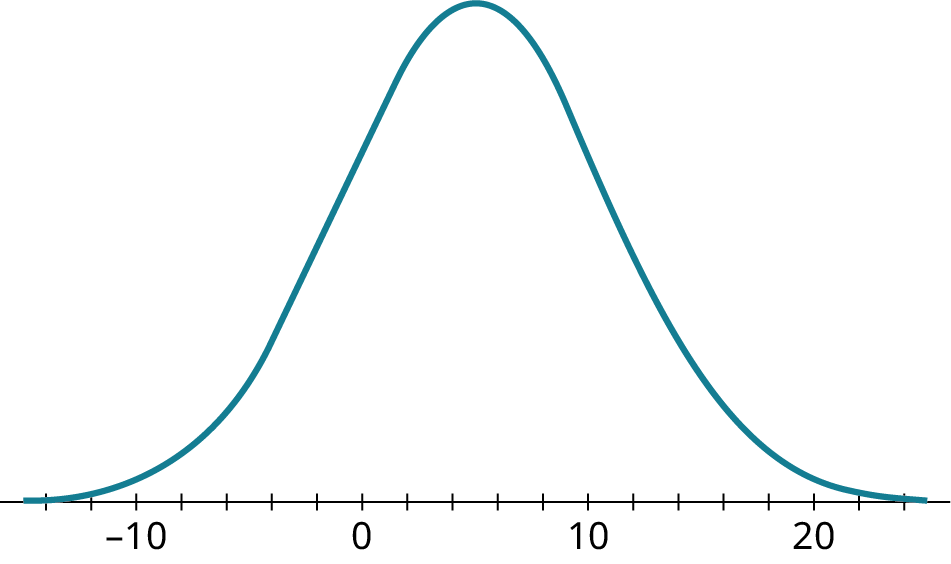
Answer
Step 1: Draw a line down from the peak.
You are told the peak is at 5.
Step 2: Starting from the peak, notice where the curve changes from curving down to curving up. Mark the point where that curvature changes, the inflection point. Draw a line down from that point. It could help you to hold an index card or other object with a perpendicular edge up to the screen.
It looks like the inflection point is around 11.
Step 3: The distance between the two numbers along the horizontal axis is an estimate of the standard deviation.
The estimate of the standard deviation is 6.
You might have been off a bit because of the difficulty of judging where the inflection point is.
6Your Turn 8.33 §8.6 source ↗
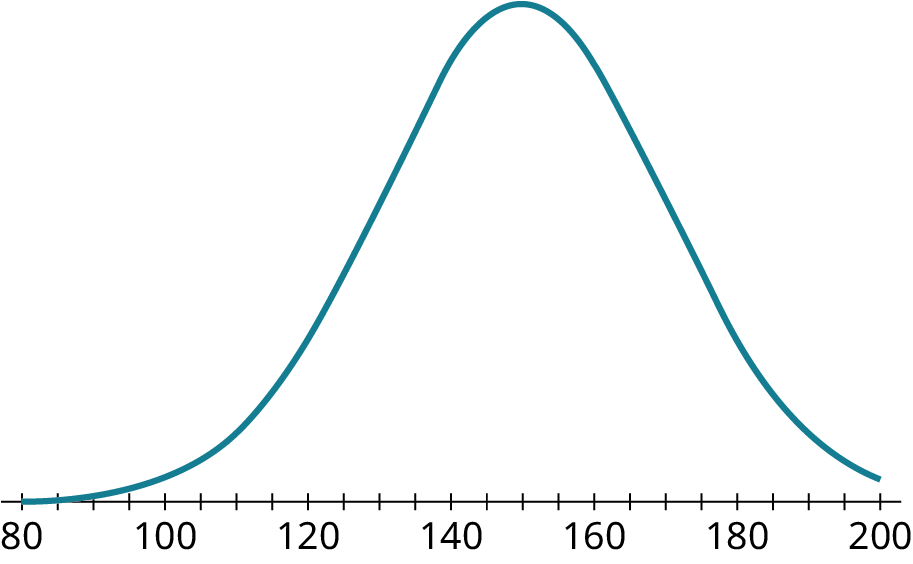
Answer
Step 1:Draw a line down from the peak. It could help you to hold an index card up to the screen. Have one edge along the horizontal axis and the other edge going through the peak. Read the position of the card on the horizontal axis. It will tell you the mean is 150.
Step 2: Starting from the peak, notice where the curve changes from curving down to curving up. Mark the point where that curvature changes, the inflection point. Draw a line down from that point. You can use your index card again to help you judge where the inflection point falls.
It looks like the inflection point is around 170.
Step 3: The distance between the two lines along the horizontal axis is an estimate of the standard deviation.
The standard deviation is 20.
You might have been off a bit because of the difficulty of judging where the inflection point is.
Mean: 150; standard deviation: 20Your Turn 8.34 §8.6 source ↗
Answer
The 68–95–99.7 Rule tells you that 68 percent of the data would fall within 3 standard deviations above or below the mean. Ninety-five percent of the data would fall within 2 standard deviations above or below the mean. Finally, 99.7 percent of the data would fall within 1 standard deviation above or below the mean.
| mean − 3 SD | mean − 2 SD | mean − 1 SD | mean | mean + 1 SD | mean + 2 SD | mean + 3 SD |
| 0 − 9 | 0 − 6 | 0 − 3 | 0 | 0 + 3 | 0 + 6 | 0 + 9 |
| −9 | −6 | −3 | 0 | 3 | 6 | 9 |
The rule tells you that 99.7 percent of the data fall between −9 and 9.
99.7%
99.7%Your Turn 8.34 (b) §8.6 source ↗
Answer
The 68–95–99.7 Rule tells you that 68 percent of the data would fall within 3 standard deviations above or below the mean. Ninety-five percent of the data would fall within 2 standard deviations above or below the mean. Finally, 99.7 percent of the data would fall within 1 standard deviation above or below the mean.
| mean − 3 SD | mean − 2 SD | mean − 1 SD | mean | mean + 1 SD | mean + 2 SD | mean + 3 SD |
| 50 − 30 | 50 − 20 | 50 − 10 | 50 | 50 + 10 | 50 + 20 | 50 + 30 |
| 20 | 30 | 40 | 50 | 60 | 70 | 80 |
The 68–95–99.7 Rule tells you that 95 percent of the data falls between 30 and 70.
95%
95%Your Turn 8.34 (c) §8.6 source ↗
Answer
The 68–95–99.7 Rule tells you that 68 percent of the data would fall within 3 standard deviations above or below the mean. Ninety-five percent of the data would fall within 2 standard deviations above or below the mean. Finally, 99.7 percent of the data would fall within 1 standard deviation above or below the mean.
| mean − 3 SD | mean − 2 SD | mean − 1 SD | mean | mean + 1 SD | mean + 2 SD | mean + 3 SD |
| 60 − 15 | 60 − 10 | 60 − 5 | 60 | 60 + 5 | 60 + 10 | 60 + 15 |
| 45 | 50 | 55 | 60 | 65 | 70 | 75 |
The 68–95–99.7 Rule tells you that 68 percent of the data falls between 55 and 65.
68%
68%Your Turn 8.35 §8.6 source ↗
Answer
65 and 75
The 68–95–99.7 Rule tells you that 68 percent of the data would fall within 3 standard deviations above or below the mean. Ninety-five percent of the data would fall within 2 standard deviations above or below the mean. Finally, 99.7 percent of the data would fall within 1 standard deviation above or below the mean.
| mean − 3 SD | mean − 2 SD | mean − 1 SD | mean | mean + 1 SD | mean + 2 SD | mean + 3 SD |
|---|---|---|---|---|---|---|
| 70 − 15 | 70 − 10 | 70 − 5 | 70 | 70 + 5 | 70 + 10 | 70 + 15 |
| 55 | 60 | 65 | 70 | 75 | 80 | 85 |
The 68–95–99.7 Rule tells you that 68 percent of the data falls within one standard deviation either side of the mean.
The values are 65 and 75.
Your Turn 8.35 (b) §8.6 source ↗
Answer
26 and 54
The 68–95–99.7 Rule tells you that 68 percent of the data would fall within 3 standard deviations above or below the mean. Ninety-five percent of the data would fall within 2 standard deviations above or below the mean. Finally, 99.7 percent of the data would fall within 1 standard deviation above or below the mean.
| mean − 3 SD | mean − 2 SD | mean − 1 SD | mean | mean + 1 SD | mean + 2 SD | mean + 3 SD |
|---|---|---|---|---|---|---|
| 40 − 21 | 40 − 14 | 40 − 7 | 40 | 40 + 7 | 40 + 14 | 40 + 21 |
| 19 | 26 | 33 | 40 | 47 | 54 | 61 |
The 68–95–99.7 Rule tells you that 95 percent of the data falls within two standard deviations of the mean.
The values are 26 and 54.
Your Turn 8.35 (c) §8.6 source ↗
Answer
110 and 290
The 68–95–99.7 Rule tells you that 68 percent of the data would fall within 3 standard deviations above or below the mean. Ninety-five percent of the data would fall within 2 standard deviations above or below the mean. Finally, 99.7 percent of the data would fall within 1 standard deviation above or below the mean.
| mean − 3 SD | mean − 2 SD | mean − 1 SD | mean | mean + 1 SD | mean + 2 SD | mean + 3 SD |
|---|---|---|---|---|---|---|
| 200 − 90 | 200 − 60 | 200 − 30 | 200 | 200 + 30 | 200 + 60 | 200 + 90 |
| 110 | 140 | 170 | 200 | 230 | 260 | 290 |
The 68–95–99.7 Rule tells you that 99.7 percent of the data falls within three standard deviations of the mean.
The values are 110 and 290.
Your Turn 8.36 §8.6 source ↗
Suppose we have data that are normally distributed with mean 500 and standard deviation 100. What proportions of the data fall in these ranges?
300 to 500
Answer
47.5%
Consider these boundaries on the normal curve.
| mean − 3 SD | mean − 2 SD | mean − 1 SD | mean | mean + 1 SD | mean + 2 SD | mean + 3 SD |
|---|---|---|---|---|---|---|
| 500 − 300 | 500 − 200 | 500 − 100 | 500 | 500 + 100 | 500 + 200 | 500 + 300 |
| 200 | 300 | 400 | 500 | 600 | 700 | 800 |
Sketch the curve and shade in the area between 300 and 500.
If it were 300 to 700, it would be 95%.
However, it is just half of that.
The 68–95–99.7 Rule tells you that 47.5% of the data values are between 300 and 500.
47.5%
Your Turn 8.36 (b) §8.6 source ↗
Suppose we have data that are normally distributed with mean 500 and standard deviation 100. What proportions of the data fall in these ranges?
600 to 800
Answer
15.85%
Consider these boundaries on the normal curve.
| mean − 3 SD | mean − 2 SD | mean − 1 SD | mean | mean + 1 SD | mean + 2 SD | mean + 3 SD |
|---|---|---|---|---|---|---|
| 500 − 300 | 500 − 200 | 500 − 100 | 500 | 500 + 100 | 500 + 200 | 500 + 300 |
| 200 | 300 | 400 | 500 | 600 | 700 | 800 |
Sketch the curve and shade in the area between 600 and 800.
What if it were 500 to 800?
If it were 200 to 800, it would be 99.7%.
However, 500 to 800 is just half of that.
49.85% of the data falls between 500 and 800.
Now you need to subtract off the data between 500 and 600.
Since 600 is one SD from the mean, you know there is 34% of the area between 500 and 600.
Subtract 34% from 49.85% to get 15.85%.
The 68–95–99.7 Rule tells you that 15.85% of the data values are between 600 and 800.
15.85%
Your Turn 8.36 (c) §8.6 source ↗
Suppose we have data that are normally distributed with mean 500 and standard deviation 100. What proportions of the data fall in these ranges?
400 to 700
Answer
81.5%
Consider these boundaries on the normal curve.
| mean − 3 SD | mean − 2 SD | mean − 1 SD | mean | mean + 1 SD | mean + 2 SD | mean + 3 SD |
|---|---|---|---|---|---|---|
| 500 − 300 | 500 − 200 | 500 − 100 | 500 | 500 + 100 | 500 + 200 | 500 + 300 |
| 200 | 300 | 400 | 500 | 600 | 700 | 800 |
Sketch the curve and shade in the area between 400 and 700.
Handle the portion left of the peak and right of the peak separately.
Left of the peak is half of the one-standard deviation from the curve portion. This is half of 68%, or 34% of the area.
Right of the peak is half of the two-standard deviation from the curve portion. This is half of 95%, or 47.5% of the area.
Add 34% and 47.5% to get 81.5%.
The 68–95–99.7 Rule tells you that 81.5% of the data values are between 400 and 700.
81.5%
Your Turn 8.37 §8.6 source ↗
Answer
If x is a member of a normally distributed dataset with mean µ and standard deviation σ, then the standardized score for x is .
Your Turn 8.38 §8.6 source ↗
Answer
If x is a member of a normally distributed dataset with mean µ and standard deviation σ, then you know a z-score, .
–44
30
6
Your Turn 8.39 §8.6 source ↗
Answer
80th
9th
97th
In an empty cell of Google Sheets, use the function NORM.DIST.
NORM.DIST(your data value, your mean, your standard deviation, TRUE)
For 25:
Using your data: =NORM.DIST(25,20,6,TRUE)
You will see the decimal version of the percentile: 0.79761619
Convert the decimal to an approximate percentage: the 80th percentile
For 12:
Using your data: =NORM.DIST(12,20,6,TRUE)
You will see the decimal version of the percentile: 0.09121121973
Convert the decimal to an approximate percentage: the 9th percentile
For 31:
Using your data: =NORM.DIST(31,20,6,TRUE)
You will see the decimal version of the percentile: 0.966234924
Convert the decimal to an approximate percentage: the 97th percentile
Your Turn 8.40 §8.6 source ↗
Answer
3.9
6.3
2.9
When your data is normally distributed and you know the percentile, mean, and standard deviation, you can find the data value with the NORM.INV function.
NORM.INV(percentile as a decimal, mean, standard deviation)
For 25th percentile:
In an empty cell in Google Sheets: =NORM.INV(0.25, 5, 1.6)
You see: 3.9208164
The approximate data value: 3.9
For the 80th percentile:
In an empty cell in Google Sheets: =NORM.INV(0.8, 5, 1.6)
You see: 6.346593972
The approximate data value: 6.3
For the 10th percentile:
In an empty cell in Google Sheets: =NORM.INV(0.1, 5, 1.6)
You see: 2.949517497
The approximate data value: 2.9
Check Your Understanding 8.6.42 §8.6 source ↗
For each of these problems, assume we’re working with normally distributed data with mean 100 and standard deviation 12.
What percentage of the data falls between 76 and 124? Use the 68-95-99.7 Rule.Answer
The 68–95–99.7 Rule tells you that 68 percent of the data would fall within 3 standard deviations above or below the mean. Ninety-five percent of the data would fall within 2 standard deviations above or below the mean. Finally, 99.7 percent of the data would fall within 1 standard deviation above or below the mean.
| mean − 3 SD | mean − 2 SD | mean − 1 SD | mean | mean + 1 SD | mean + 2 SD | mean + 3 SD |
|---|---|---|---|---|---|---|
| 100 − 36 | 100 − 24 | 100 − 12 | 100 | 100 + 12 | 100 + 24 | 100 + 36 |
| 64 | 76 | 88 | 100 | 112 | 124 | 136 |
76 and 124 are two standard deviations above and below the mean. The 68–95–99.7 Rule tells you that 95 percent of the data values are between 76 and 124.
95%
95%Check Your Understanding 8.6.43 §8.6 source ↗
For each of these problems, assume we’re working with normally distributed data with mean 100 and standard deviation 12.
What percentage of the data falls between 100 and 112? Use the 68-95-99.7 Rule.Answer
The 68–95–99.7 Rule tells you that 68 percent of the data would fall within 3 standard deviations above or below the mean. Ninety-five percent of the data would fall within 2 standard deviations above or below the mean. Finally, 99.7 percent of the data would fall within 1 standard deviation above or below the mean.
| mean − 3 SD | mean − 2 SD | mean − 1 SD | mean | mean + 1 SD | mean + 2 SD | mean + 3 SD |
|---|---|---|---|---|---|---|
| 100 − 36 | 100 − 24 | 100 − 12 | 100 | 100 + 12 | 100 + 24 | 100 + 36 |
| 64 | 76 | 88 | 100 | 112 | 124 | 136 |
Sketch the curve and shade in the area between 100 and 112.
88 and 112 are one standard deviation above and below the mean. The 68–95–99.7 Rule tells you that 68 percent of the data values are between 88 and 112. Your shaded area is half of that, so your shaded area covers 34 percent of the data.
34%
34%Check Your Understanding 8.6.44 §8.6 source ↗
For each of these problems, assume we’re working with normally distributed data with mean 100 and standard deviation 12.
At what percentile does 112 fall? Use the 68-95-99.7 Rule.Answer
The 68–95–99.7 Rule tells you that 68 percent of the data would fall within 3 standard deviations above or below the mean. Ninety-five percent of the data would fall within 2 standard deviations above or below the mean. Finally, 99.7 percent of the data would fall within 1 standard deviation above or below the mean.
| mean − 3 SD | mean − 2 SD | mean − 1 SD | mean | mean + 1 SD | mean + 2 SD | mean + 3 SD |
|---|---|---|---|---|---|---|
| 100 − 36 | 100 − 24 | 100 − 12 | 100 | 100 + 12 | 100 + 24 | 100 + 36 |
| 64 | 76 | 88 | 100 | 112 | 124 | 136 |
Sketch the curve and shade in the area between 100 and 112.
88 and 112 are one standard deviation above and below the mean. The 68–95–99.7 Rule tells you that 68 percent of the data values are between 88 and 112. Your shaded area is half of that, so your shaded area covers 34 percent of the data.
To find the total area below 112, add 50% of the curve below 100.
Since 84% of the data values are below 112, you know that 112 falls at the 84th percentile.
84th
84thCheck Your Understanding 8.6.45 §8.6 source ↗
For each of these problems, assume we’re working with normally distributed data with mean 100 and standard deviation 12.
What’s the -score of the data value 107? Round to three decimal places.Answer
Check Your Understanding 8.6.46 §8.6 source ↗
For each of these problems, assume we’re working with normally distributed data with mean 100 and standard deviation 12.
What data value’s -score is –2.4?Answer
Check Your Understanding 8.6.47 §8.6 source ↗
For each of these problems, assume we’re working with normally distributed data with mean 100 and standard deviation 12.
At what percentile does 107 fall? Use Google Sheets (or another technology).Answer
In an empty cell of Google Sheets, use the function NORM.DIST.
NORM.DIST(your data value, your mean, your standard deviation, TRUE)
Using your data: =NORM.DIST(107, 100, 12,TRUE)
You will see the decimal version of the percentile: 0.7201655364
Convert the decimal to an approximate percentage: the 72nd percentile
Check Your Understanding 8.6.48 §8.6 source ↗
For each of these problems, assume we’re working with normally distributed data with mean 100 and standard deviation 12.
What data value is at the 90th percentile? Use Google Sheets (or another technology), and round to the nearest hundredth.Answer
When your data is normally distributed and you know the percentile, mean, and standard deviation, you can find the data value with the NORM.INV function.
NORM.INV(percentile as a decimal, mean, standard deviation)
In an empty cell in Google Sheets: =NORM.INV(0.90, 100, 12)
You see: 115.3786188
The approximate value: 115.38
Your Turn 8.41 §8.7 source ↗
According to the Graduate Management Admission Council (GMAC), the mean score on the GMAT (an entrance exam for graduate schools in business management) is 565, with standard deviation 116. For the LSAT (an entrance exam for law schools), Kaplan informs us that the mean score is 150 with standard deviation 10.
What is the -score for a GMAT score of 715?Answer
Your Turn 8.41 (b) §8.7 source ↗
According to the Graduate Management Admission Council (GMAC), the mean score on the GMAT (an entrance exam for graduate schools in business management) is 565, with standard deviation 116. For the LSAT (an entrance exam for law schools), Kaplan informs us that the mean score is 150 with standard deviation 10.
At what percentile is an LSAT score of 166?Answer
In an empty cell of Google Sheets, use the function NORM.DIST.
NORM.DIST(your data value, your mean, your standard deviation, TRUE)
Using your data: =NORM.DIST(166, 150, 10,TRUE)
You will see the decimal version of the percentile: 0.9452007083
Convert the decimal to an approximate percentage: the 94.5th percentile
Your Turn 8.41 (c) §8.7 source ↗
According to the Graduate Management Admission Council (GMAC), the mean score on the GMAT (an entrance exam for graduate schools in business management) is 565, with standard deviation 116. For the LSAT (an entrance exam for law schools), Kaplan informs us that the mean score is 150 with standard deviation 10.
Which is better: a GMAT score of 650 or an LSAT score of 161?Answer
Find the percentile score for both scores.
GMAT of 650:
In an empty cell of Google Sheets, use the function NORM.DIST.
NORM.DIST(your data value, your mean, your standard deviation, TRUE)
Using your data: =NORM.DIST(650, 565, 116,TRUE)
You will see the decimal version of the percentile: 0.7681471684
Convert the decimal to an approximate percentage: the 76.8th percentile
LSAT of 161:
In an empty cell of Google Sheets, use the function NORM.DIST.
NORM.DIST(your data value, your mean, your standard deviation, TRUE)
Using your data: =NORM.DIST(161, 150, 10,TRUE)
You will see the decimal version of the percentile: 0.8643339391
Convert the decimal to an approximate percentage: the 86.4th percentile
The GMAT score is at the 76.8th percentile and the LSAT score is at the 86.4th percentile. The LSAT score is better.
Your Turn 8.42 §8.7 source ↗
You flip a coin 144 times and count the number of heads.
What is the mean of the corresponding distribution?Answer
Since the number of heads is distributed normally, it can be shown that the mean of n flips is and the standard deviation is as long as .
Since n is 144, is 72.
The mean is 72.
72Your Turn 8.42 (b) §8.7 source ↗
You flip a coin 144 times and count the number of heads.
What is the standard deviation of the corresponding distribution?Answer
Since the number of heads is distributed normally, it can be shown that the mean of n flips is and the standard deviation is as long as .
Since n is 144, .
The standard deviation is 6.
6Your Turn 8.42 (c) §8.7 source ↗
You flip a coin 144 times and count the number of heads.
You flipped 81 heads. At what percentile does that fall?Answer
Since the number of heads is distributed normally, it can be shown that the mean of n flips is and the standard deviation is as long as .
Since n is 144, is 72.
The mean is 72.
.
The standard deviation is 6.
In an empty cell of Google Sheets, use the function NORM.DIST.
NORM.DIST(your data value, your mean, your standard deviation, TRUE)
Your data value is 81, your mean is 72, and your standard deviation is 6.
Using your data: =NORM.DIST(81, 72, 6,TRUE)
You will see the decimal version of the percentile: 0.9331927987
Convert the decimal to an approximate percentage: the 93rd percentile
93rdYour Turn 8.43 §8.7 source ↗
Answer
Using NORM.INV: 1092.8
Using PERCENTILE: 1085
Open a copy of the file in Google Sheets. You cannot edit the original file.
Look for the AvgSAT tab.
Look for the Average SAT Score column.
FIRST METHOD: NORM.INV
To use this function, you need to know the mean and standard deviation.
The function to find the mean: =AVERAGE(C:C)
The mean is approximately 1141.174114
The function to find the standard deviation: =STDEV(C:C)
The standard deviation is approximately 125.516043
When your data is normally distributed and you know the percentile, mean, and standard deviation, you can find the data value with the NORM.INV function.
NORM.INV(percentile as a decimal, mean, standard deviation)
You want the value at the 35th percentile, so the first argument is 0.35.
In an empty cell in Google Sheets: =NORM.INV(0.35, 1141.174114, 125.516043)
You see: 1092.809961
The approximate value: 1092.8
SECOND METHOD: PERCENTILE
You want the score at the 35th percentile.
In a blank cell, enter the function: =PERCENTILE(
Click on the letter at the top of the Average SAT Score column.
Then enter a comma, the percentile as a decimal and close the parentheses: ,0.35)
The complete function probably looks like this: =PERCENTILE(C:C,0.35)
The number you see is 1085.
The NORM.INV method yielded 1092.8 while the PERCENTILE method gave you 1085.
Check Your Understanding 8.7.49 §8.7 source ↗
For the following problems, recall that the SAT exam has mean 1060 and standard deviation 195, and that composite scores on the ACT have mean 21 and standard deviation 5.
At what percentile would an SAT score of 940 fall? Round to the nearest whole number.Answer
In an empty cell of Google Sheets, use the function NORM.DIST.
NORM.DIST(your data value, your mean, your standard deviation, TRUE)
Using your data: =NORM.DIST(940, 1060, 195,TRUE)
You will see the decimal version of the percentile: 0.2691503745
Convert the decimal to an approximate percentage: the 27th percentile
27thCheck Your Understanding 8.7.50 §8.7 source ↗
For the following problems, recall that the SAT exam has mean 1060 and standard deviation 195, and that composite scores on the ACT have mean 21 and standard deviation 5.
What score would be at the 67th percentile on the ACT?Answer
When your data is normally distributed and you know the percentile, mean, and standard deviation, you can find the data value with the NORM.INV function.
NORM.INV(percentile as a decimal, mean, standard deviation)
Convert the 67th percentile to 0.67.
In an empty cell in Google Sheets: =NORM.INV(0.67, 21, 5)
You see: 23.19956583
The approximate value: 23.2
23.2
Check Your Understanding 8.7.51 §8.7 source ↗
For the following problems, recall that the SAT exam has mean 1060 and standard deviation 195, and that composite scores on the ACT have mean 21 and standard deviation 5.
Which is a better score: 1300 on the SAT or 27 on the ACT?Answer
In an empty cell of Google Sheets, use the function NORM.DIST.
NORM.DIST(your data value, your mean, your standard deviation, TRUE)
Find the percentile for the 1300 on the SAT.
Using your data: =NORM.DIST(1300, 1060, 195,TRUE)
You will see the decimal version of the percentile: 0.8907954067
Convert the decimal to an approximate percentage: the 89.1st percentile
Find the percentile for the 27 on the ACT.
In an empty cell in Google Sheets: =NORM.DIST(27, 21, 5,TRUE)
You will see the decimal version of the percentile: 0.8849303298
Convert the decimal to an approximate percentage: the 88.4th percentile
The 1300 is at the 89.1st percentile while the 27 is at the 88.4th percentile. The 1300 on the SAT is the better score.
1300 on the SAT
Check Your Understanding 8.7.52 §8.7 source ↗
For the following problems, recall that if we flip a coin at least 20 times, the distribution of the number of heads is approximately normal with mean equal to half the number of flips and standard deviation equal to half of the square root of the number of flips.
Suppose we flip a coin 120 times. What are the mean and standard deviation of the corresponding distribution of heads?Answer
Since the number of heads is distributed normally, it can be shown that the mean of n flips is and the standard deviation is as long as .
Since n is 120, the mean is .
The standard deviation is .
;Check Your Understanding 8.7.53 §8.7 source ↗
For the following problems, recall that if we flip a coin at least 20 times, the distribution of the number of heads is approximately normal with mean equal to half the number of flips and standard deviation equal to half of the square root of the number of flips.
Let’s say you flip 70 heads in 120 flips. At what percentile would that fall?Answer
Since the number of heads is distributed normally, it can be shown that the mean of n flips is and the standard deviation is as long as .
Since n is 120, the mean is .
The standard deviation is .
Use your mean and standard deviation and the technology of Google Sheets.
In an empty cell of Google Sheets, use the function NORM.DIST.
NORM.DIST(your data value, your mean, your standard deviation, TRUE)
Using your data: =NORM.DIST(70, 60, 5.477,TRUE)
You will see the decimal version of the percentile: 0.9660610881
Convert the decimal to an approximate percentage: the 96.6th percentile
96.6thCheck Your Understanding 8.7.54 §8.7 source ↗
For the following problems, recall that if we flip a coin at least 20 times, the distribution of the number of heads is approximately normal with mean equal to half the number of flips and standard deviation equal to half of the square root of the number of flips.
How many heads would be at the 30th percentile? Round to the nearest whole number.Answer
Since the number of heads is distributed normally, it can be shown that the mean of n flips is and the standard deviation is as long as .
Since n is 120, the mean is .
The standard deviation is .
Use your mean and standard deviation and the technology of Google Sheets.
When your data is normally distributed and you know the percentile, mean, and standard deviation, you can find the data value with the NORM.INV function.
NORM.INV(percentile as a decimal, mean, standard deviation)
In an empty cell in Google Sheets: =NORM.INV(0.30, 60, 5.477)
What you see: 57.12785839
Rounded version: 57
57Check Your Understanding 8.7.55 §8.7 source ↗
For the following problems, use the data in “World Tax,” which gives the tax revenue of many countries of the world in 2017, expressed as a percentage of their gross domestic products. You can assume that the distribution is approximately normal (but you can make a histogram to check, if you want).
What tax revenue percentage falls at the third quartile? Answer this question using Google Sheets in two ways: using PERCENTILE and using NORM.INV.Answer
Quartiles break the data into fourths. You want the score at the 75th percentile.
Open a copy of the file in Google Sheets. You cannot edit the original file.
Look for the World Tax tab.
Look for the 2017 column which holds the tax revenue.
Since 2017 is a number, change the header to “Tax Revenue for 2017.”
USING PERCENTILE:
In a blank cell, enter the function: =PERCENTILE(
Click on the letter at the top of what used to be the 2017 column.
Then enter a comma, the percentile as a decimal and close the parentheses: ,0.75)
The complete function probably looks like this: =PERCENTILE(B:B,0.75)
The tax revenue you see is 20.7689625 or approximately 20.77%.
USING NORM.INV:
To use this function, you need to know the mean and standard deviation.
The function to find the mean: =AVERAGE(B:B,0.5)
The mean is approximately 16.52854749
The function to find the standard deviation: =STDEV(B:B)
The standard deviation is approximately 6.172307157.
When your data is normally distributed and you know the percentile, mean, and standard deviation, you can find the data value with the NORM.INV function.
NORM.INV(percentile as a decimal, mean, standard deviation)
You want the value at the 75th percentile, so the first argument is 0.75.
In an empty cell in Google Sheets: =NORMINV(0.75, 16.52854749, 6.172307157)
You see: 20.6917054
The approximate value: 20.69%
The PERCENTILE method gives you 20.77%. (If you forgot and left 2017 as the header, you got 20.86.)
The NORM.INV method gave you around 20.69%. Your answer could vary a bit depending on how many decimal places you kept in the mean and standard deviation.
PERCENTILE gives 20.86; NORM.INV gives 21.11.
Check Your Understanding 8.7.56 §8.7 source ↗
For the following problems, use the data in “World Tax,” which gives the tax revenue of many countries of the world in 2017, expressed as a percentage of their gross domestic products. You can assume that the distribution is approximately normal (but you can make a histogram to check, if you want).
What tax revenue percentage falls at the 20th percentile? Answer this question using Google Sheets in two ways: using PERCENTILE and using NORM.INV.Answer
Open a copy of the file in Google Sheets. You cannot edit the original file.
Look for the World Tax tab.
Look for the 2017 column which holds the tax revenue.
Since 2017 is a number, change the header to “Tax Revenue for 2017” (otherwise you would do calculations with 2017 and treat it as one of the data values).
USING PERCENTILE:
In a blank cell, enter the function: =PERCENTILE(
Click on the letter at the top of what used to be the 2017 column.
Then enter a comma, the percentile as a decimal and close the parentheses: ,0.20)
The complete function probably looks like this: =PERCENTILE(B:B,0.2)
The tax revenue you see is 11.4804963or approximately 11.48%.
USING NORM.INV:
To use this function, you need to know the mean and standard deviation.
The function to find the mean: =AVERAGE(B:B)
The mean is approximately 16.52854749
The function to find the standard deviation: =STDEV(B:B) (remove the header temporarily)
The standard deviation is approximately 6.172307157
When your data is normally distributed and you know the percentile, mean, and standard deviation, you can find the data value with the NORM.INV function.
NORM.INV(percentile as a decimal, mean, standard deviation)
You want the value at the 75th percentile, so the first argument is 0.75.
In an empty cell in Google Sheets: =NORMINV(0.20, 16.52854749, 6.172307157)
You see: 11.33380273
The approximate value: 11.33%
The PERCENTILE method gives you 11.48%.
The NORM.INV method gave you around 11.33%. Your answer could vary a bit depending on how many decimal places you kept in the mean and standard deviation.
PERCENTILE gives 11.82; NORM.INV gives 11.68.
Check Your Understanding 8.7.57 §8.7 source ↗
For the following problems, use the data in “World Tax,” which gives the tax revenue of many countries of the world in 2017, expressed as a percentage of their gross domestic products. You can assume that the distribution is approximately normal (but you can make a histogram to check, if you want).
At what percentile does the United Kingdom (25.62%, found on row 46 in the spreadsheet) fall? Answer this question using Google Sheets in two ways: using PERCENTRANK and using NORM.DIST.Answer
Check Your Understanding 8.7.58 §8.7 source ↗
For the following problems, use the data in “World Tax,” which gives the tax revenue of many countries of the world in 2017, expressed as a percentage of their gross domestic products. You can assume that the distribution is approximately normal (but you can make a histogram to check, if you want).
At what percentile does Kiribati (21.97%, found on row 62 in the spreadsheet) fall? Answer this question using Google Sheets in two ways: using PERCENTRANK and using NORM.DIST.Answer
Your Turn 8.44 §8.8 source ↗
Given these pairs of datasets, identify which (if either) would be the best choice for the response variable.
A person’s age and their annual incomeAnswer
Your Turn 8.44 (b) §8.8 source ↗
Given these pairs of datasets, identify which (if either) would be the best choice for the response variable.
A student’s GPA and their score on the SATAnswer
Your Turn 8.44 (c) §8.8 source ↗
Given these pairs of datasets, identify which (if either) would be the best choice for the response variable.
A student’s GPA and the number of hours they spend studying per weekAnswer
Your Turn 8.45 §8.8 source ↗
| Player | Receptions | Yards |
|---|---|---|
| Stefon Diggs | 127 | 1535 |
| Davante Adams | 115 | 1374 |
| DeAndre Hopkins | 115 | 1407 |
| Darren Waller | 107 | 1196 |
| Travis Kelce | 105 | 1416 |
Answer
A scatter plot is a visualization of the relationship between two sets of data. You turn the dataset into ordered pairs. The first coordinate is from the explanatory dataset and the second coordinate contains the corresponding value from the response dataset. Plot these points in the xy-plane.
Use the receptions as the x-coordinates and the yards as the y-coordinates.
(127, 1535), (115, 1374), (115, 1407), (114, 1407), (105, 1416)
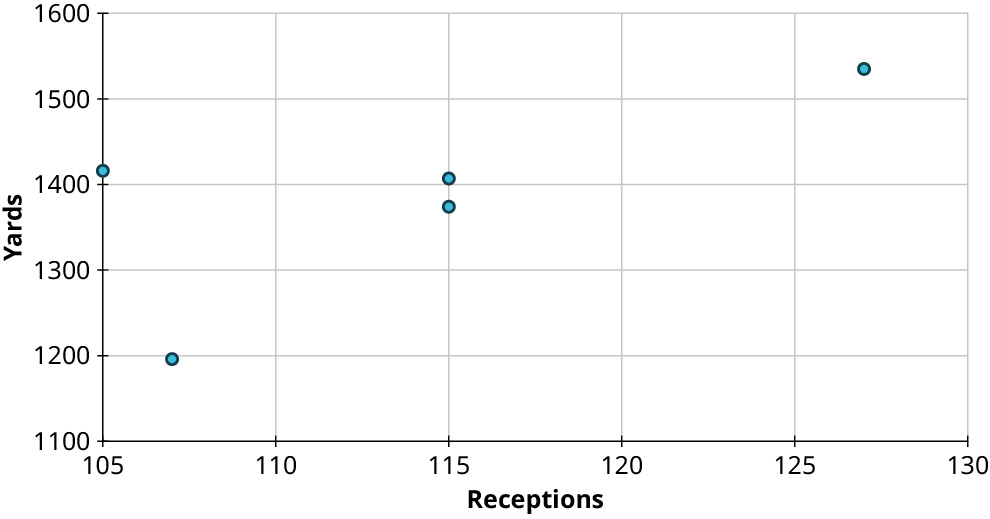
Your Turn 8.46 §8.8 source ↗
Answer
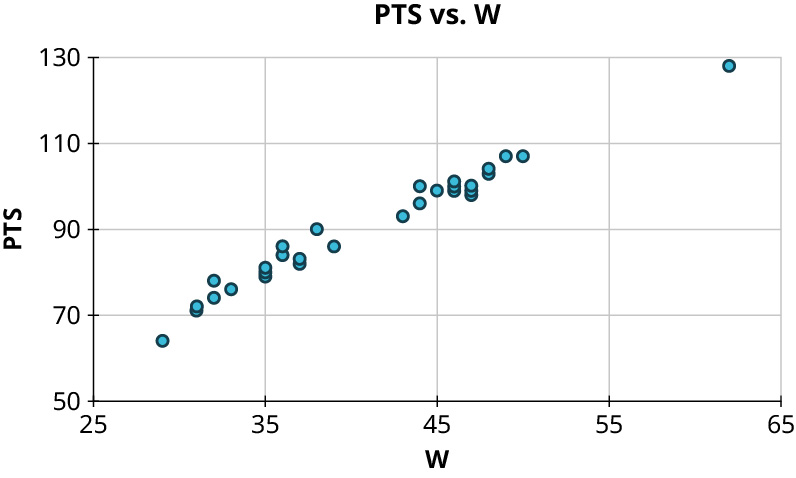
In Google Sheets, highlight the data including the headers.
Open a copy of the file in Google Sheets. You cannot edit the original file.
Look for the NHL19 tab.
It will be easier for Google to suggest what you want if your columns are adjacent. Copy the Points column to the left of the Wins column.
Highlight the columns for PTS (Points) and W (Wins), (including the headers).
Choose Insert, then choose Chart.
It may suggest a line chart in “Chart type.”
In the Chart type drop down box, choose a scatter plot.
Make sure that you see “W” on the horizontal axis.
Your Turn 8.47 §8.8 source ↗
For each of the plots below, answer the following questions:
a. Is there a curved pattern in the data? If yes, stop here. If no, continue to part b.
b. Classify the strength and direction of the relationship. Make a guess at the value of .
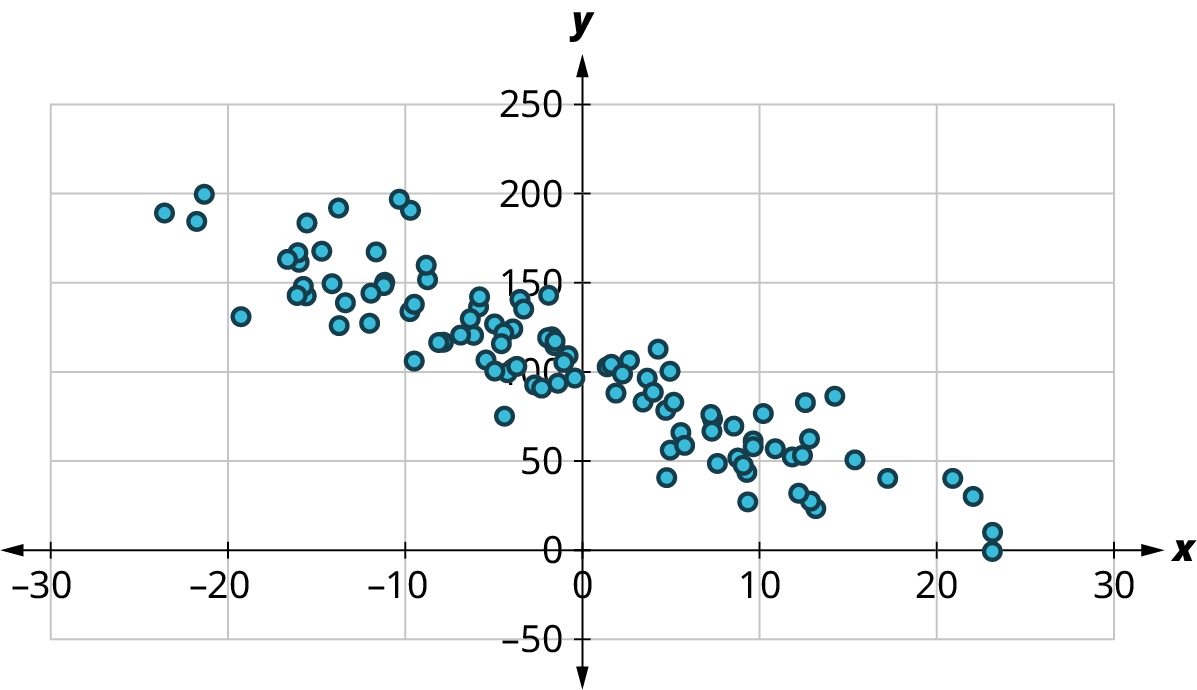
Answer
a. No curved pattern
b. Strong negative relationship,
a. No, this is not curved.
b. This has a fairly strong negative relationship, with a possible r value of −0.9.
The correlation coefficient (r) denotes the strength and direction of a linear relationship. Positive values near 1 indicate that as one variable increases, the other does. The closer r is to −1, the more likely that as one variable increases, the other decreases. If r is zero, there is no relationship. A value of plus or minus 0.7 is considered the dividing line between strong and weak relationships. For this relationship, your guess could have been anywhere between −0.8 and −0.95. To know r for certain, you would need to do calculations using the coordinates of the points.
Your Turn 8.47 (b) §8.8 source ↗
For each of the plots below, answer the following questions:
a. Is there a curved pattern in the data? If yes, stop here. If no, continue to part b.
b. Classify the strength and direction of the relationship. Make a guess at the value of .
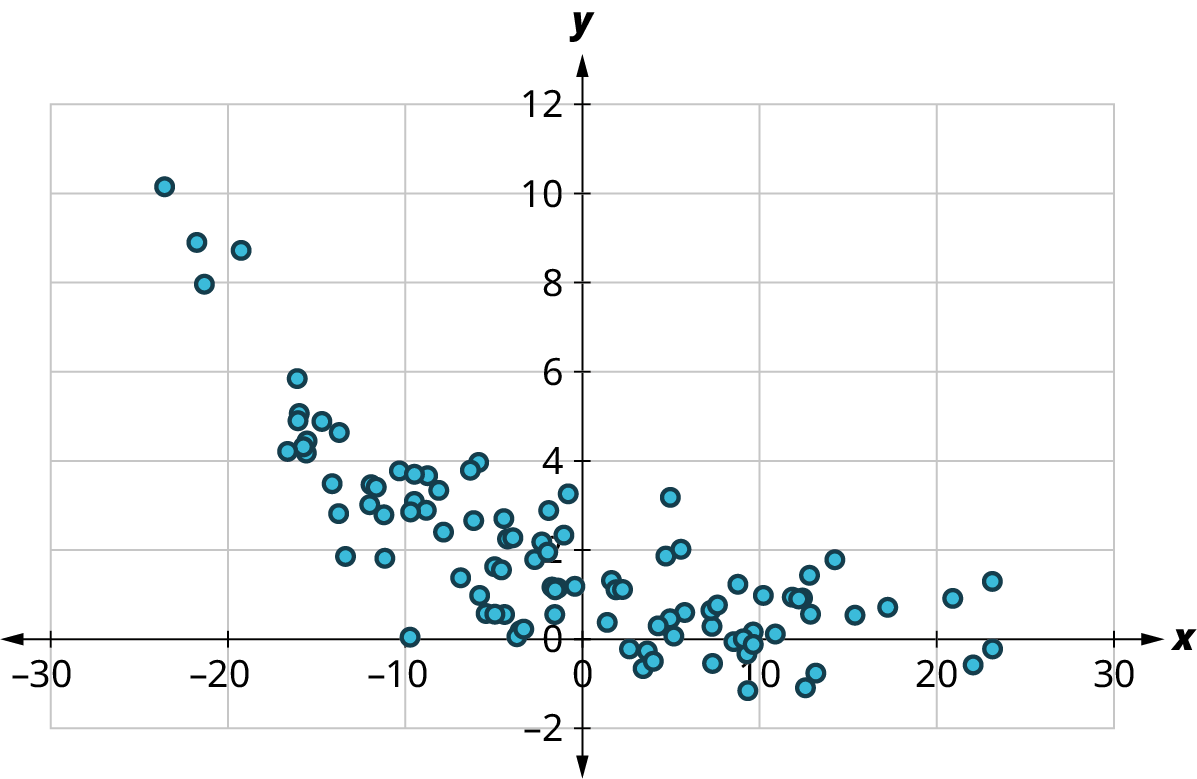
Answer
a. Curved pattern
a. Yes, this is curved.Your Turn 8.47 (c) §8.8 source ↗
For each of the plots below, answer the following questions:
a. Is there a curved pattern in the data? If yes, stop here. If no, continue to part b.
b. Classify the strength and direction of the relationship. Make a guess at the value of .
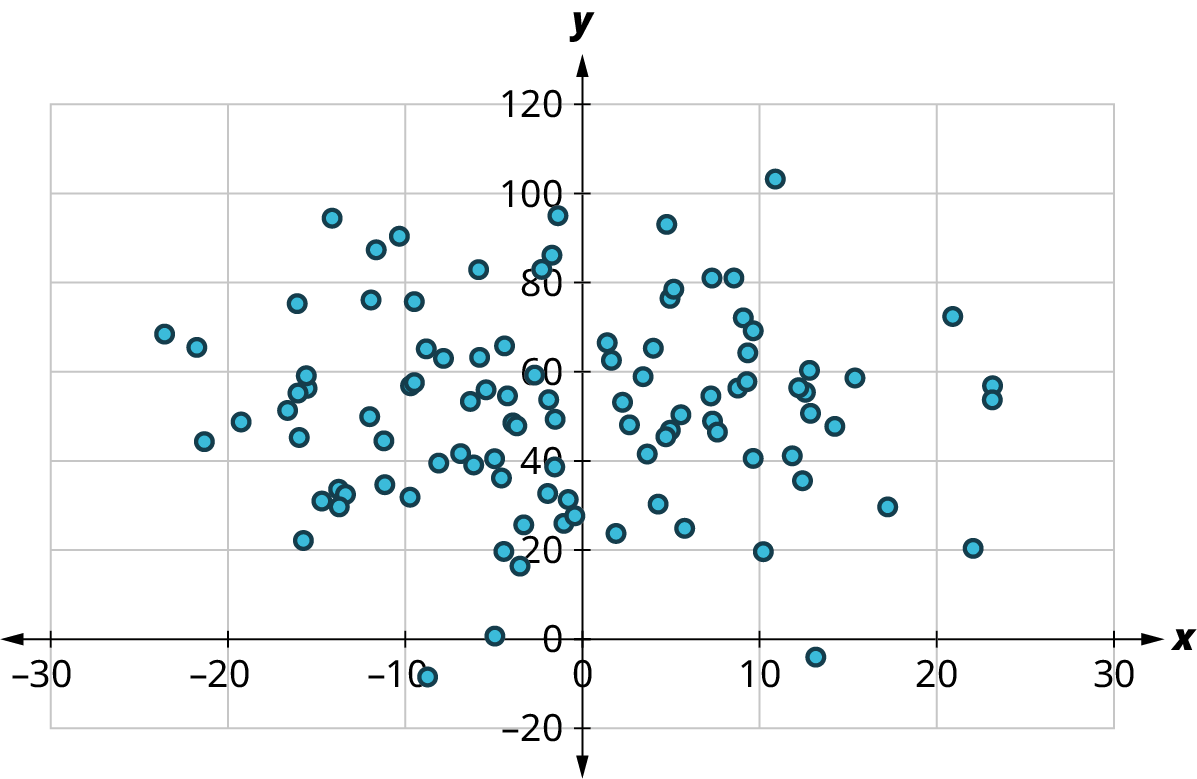
Answer
a. No curved pattern
b. No apparent relationship,
a. No, this is not curved.
b. This has no relationship, with an r value of 0.
The correlation coefficient (r) denotes the strength and direction of a linear relationship. Positive values near 1 indicate that as one variable increases, the other does. The closer r is to −1, the more likely that as one variable increases, the other decreases. If r is zero, there is no relationship. A value of plus or minus 0.7 is considered the dividing line between strong and weak relationships.
Your Turn 8.47 (d) §8.8 source ↗
For each of the plots below, answer the following questions:
a. Is there a curved pattern in the data? If yes, stop here. If no, continue to part b.
b. Classify the strength and direction of the relationship. Make a guess at the value of .
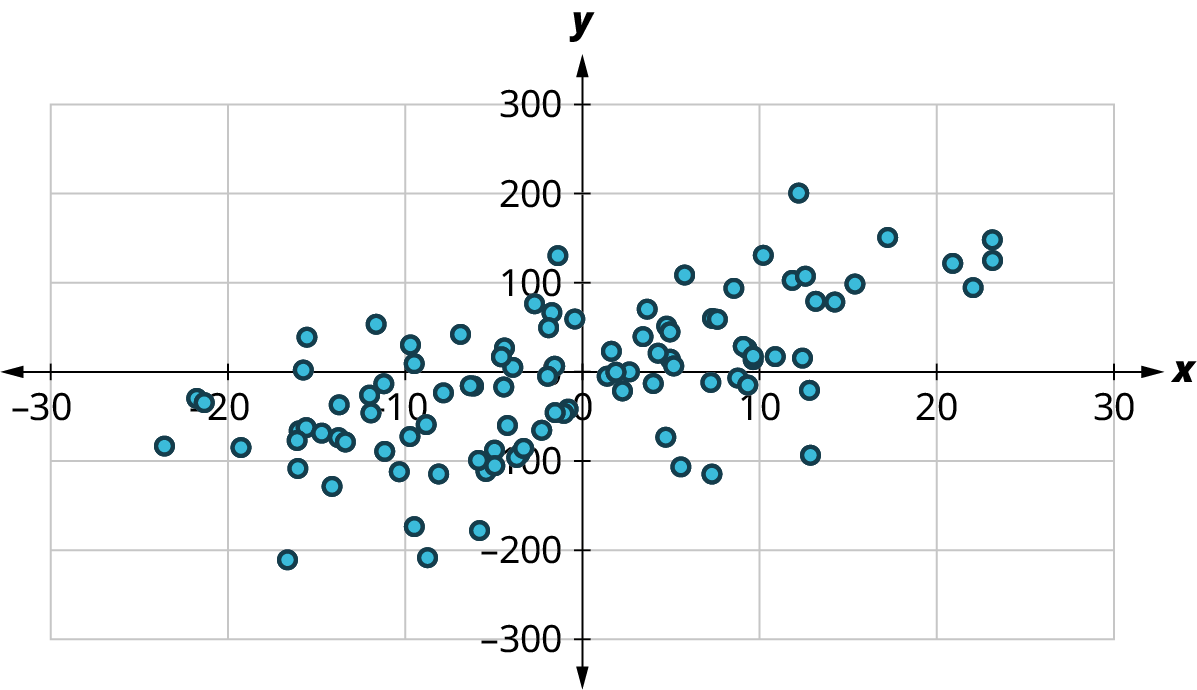
Answer
a. No curved pattern
b. Weak positive relationship,
a. No, this is not curved.
b. This has a weak positive relationship, with an r value of 0.6
The correlation coefficient (r) denotes the strength and direction of a linear relationship. Positive values near 1 indicate that as one variable increases, the other does. The closer r is to −1, the more likely that as one variable increases, the other decreases. If r is zero, there is no relationship. A value of plus or minus 0.7 is considered the dividing line between strong and weak relationships. Your estimate of r may have been different. To know r for certain, you would need to do calculations using the coordinates of the points.
Your Turn 8.48 §8.8 source ↗
Answer
1.
2. Not appropriate
3.
4.
Your Turn 8.49 §8.8 source ↗
Answer
If x and y are explanatory and response datasets with means and respectively, and standard deviations, and respectively, and correlation coefficient r, then the equation of the regression line is
Your Turn 8.50 §8.8 source ↗
Answer
In Google Sheets, highlight the data including the headers.
Open a copy of the file in Google Sheets. You cannot edit the original file.
Look for the NHL19 tab.
It will be easier for Google to suggest what you want if your columns are adjacent. Copy the Points column to the left of the Wins column.
Highlight the columns for PTS (Points) and W (Wins) (including the headers).
Choose Insert, then choose Chart.
It may suggest a line chart in “Chart type.”
In the Chart type drop down box, choose a scatter plot.
Make sure that the “Series” selected are PTS vs W.
Once you have the scatter plot, Google Sheets can generate the regression line by clicking the three dots at the top right of the plot.
Then select “Edit chart.”
Then click on “Customize” and “Series.”
Then add the regression line by checking the box next to “Trendline.”
Show the equation by selection “Use Equation” in the drop-down menu under “Label.”
The equation appears on the graph: 1.8*x + 16.9
The “y = ” is implied.
Your Turn 8.51 §8.8 source ↗
Using the “MLB2019Off” dataset, answer the following:
What is the equation of the regression line for the number of times a runner is caught stealing a base (CS) vs. the number of successful stolen bases (SB)?Answer
Your Turn 8.51 (b) §8.8 source ↗
Using the “MLB2019Off” dataset, answer the following:
How many times would we expect a team to be caught stealing if the team steals 70 bases in a season?Answer
Your Turn 8.51 (c) §8.8 source ↗
Using the “MLB2019Off” dataset, answer the following:
Did the Philadelphia Phillies (PHI) overperform or underperform in terms of getting caught stealing, based on their stolen base total? By how much?Answer
Your Turn 8.51 (d) §8.8 source ↗
Using the “MLB2019Off” dataset, answer the following:
Write a sentence to interpret the slope of the regression line.Answer
Your Turn 8.52 §8.8 source ↗
Use the data in “WNBA2019” to answer these questions about the relationship between the proportion of made field goals (FG%) and the proportion of made three-point field goals (3P%):
What is the equation of the regression line for proportion of made three-point field goals vs. proportion of made field goals?Answer
In Google Sheets, highlight the data including the headers.
Open a copy of the file in Google Sheets. You cannot edit the original file.
Look for the WNBA2019 tab.
It will be easier for Google to suggest what you want if your columns are adjacent. First create a blank column to the right of the column FG%. Then copy the column 3P% into the blank column.
Highlight the columns for FG% and 3P% (including the headers).
Choose Insert, then choose Chart.
It may suggest a line chart in “Chart type.”
In the Chart type drop down box, choose a scatter plot.
Make sure that FG% is on the horizontal axis.
Once you have the scatter plot, Google Sheets can generate the regression line by clicking the three dots at the top right of the plot.
Then select “Edit chart.”
Then click on “Customize” and “Series.”
Then add the regression line by checking the box next to “Trendline.”
Show the equation by selection “Use Equation” in the drop-down menu under “Label.”
The equation appears on the graph: 0.548*x + 0.106
The “y = ” is implied.
, where x is the proportion of made field goals and y is the proportion of made three-point field goals
Your Turn 8.52 (b) §8.8 source ↗
Use the data in “WNBA2019” to answer these questions about the relationship between the proportion of made field goals (FG%) and the proportion of made three-point field goals (3P%):
What proportion of made three-point field goals would we expect for a team that makes 44% of its field goals?Answer
Use the equation, , where x is the proportion of field goals and y is the proportion of three-point field goals.
Substitute 0.44 for x.
You would expect a proportion of 0.347.
Your Turn 8.52 (c) §8.8 source ↗
Use the data in “WNBA2019” to answer these questions about the relationship between the proportion of made field goals (FG%) and the proportion of made three-point field goals (3P%):
Did the Dallas Wings overperform or underperform in terms of proportion of made three-point field goals, based on the team’s proportion of made field goals?Answer
Your Turn 8.52 (d) §8.8 source ↗
Use the data in “WNBA2019” to answer these questions about the relationship between the proportion of made field goals (FG%) and the proportion of made three-point field goals (3P%):
Write a sentence to interpret the slope of the regression line.Answer
The regression equation is .
The slope is 0.548.
This tells you that an increase of one percent in the field goal attempts will result, in the long term, in an expected increase of around 55 percent in made three-point field goal attempts.
An increase of 1% in made field goal attempts will result in an expected increase of 0.55% in made three-point field goal attempts.Check Your Understanding 8.8.59 §8.8 source ↗
| 20 | 11 | 8 | 22 | 25 | |
| 13 | 15 | 17 | 13 | 10 |
Answer
A scatter plot is a visualization of the relationship between two sets of data. You turn the dataset into ordered pairs. The first coordinate is from the explanatory dataset and the second coordinate contains the corresponding value from the response dataset. Plot these points in the xy-plane.
Create your (x, y) coordinate pairs and plot the points. For instance, the first point is (20, 13). The next is (11, 15). Continue until you plot (25, 10).
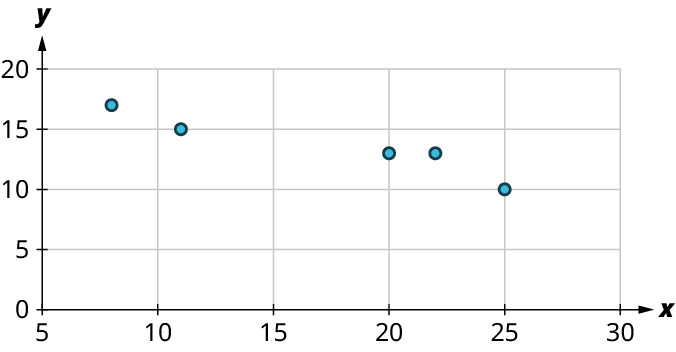
Check Your Understanding 8.8.60 §8.8 source ↗
For the following problems, answer these questions:
a. Is there a curved pattern in the data? If yes, stop here.
b. Classify the strength and direction of the relationship. Make a guess at the value of .
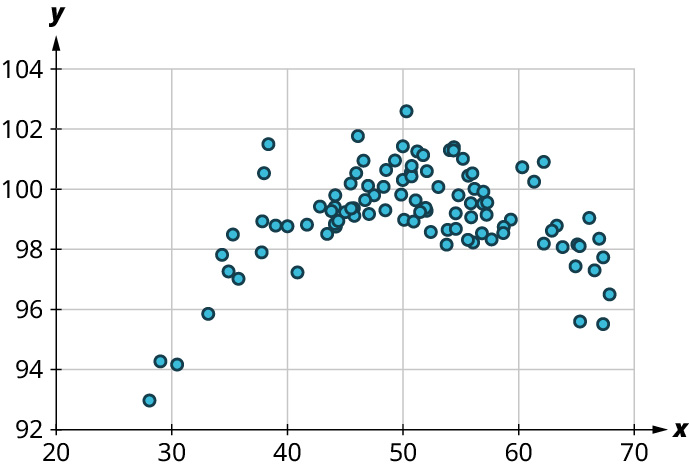
Answer
a. Yes
a. Yes, this is curved.Check Your Understanding 8.8.61 §8.8 source ↗
For the following problems, answer these questions:
a. Is there a curved pattern in the data? If yes, stop here.
b. Classify the strength and direction of the relationship. Make a guess at the value of .
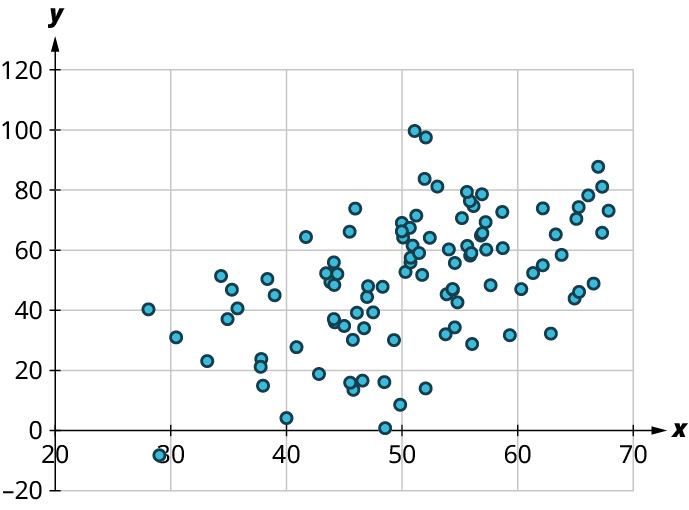
Answer
a. No
b. Weak positive relationship;
a. No, this is not curved.
b. This has a weak positive relationship, with a possible r value of around 0.5.
The correlation coefficient (r) denotes the strength and direction of a linear relationship. Positive values near 1 indicate that as one variable increases, the other does. The closer r is to −1, the more likely that as one variable increases, the other decreases. If r is zero, there is no relationship. A value of plus or minus 0.7 is considered the dividing line between strong and weak relationships. For this relationship, your guess could have been anywhere between 0.4 and 0.6. To know r for certain, you would need to do calculations using the coordinates of the points.
Check Your Understanding 8.8.62 §8.8 source ↗
Use the data in "MLB2019Off" to investigate the relationship between slugging percentage (SLG, explanatory) and runs scored (R, response).
What’s the correlation coefficient? Round to the nearest hundredth.Answer
Check Your Understanding 8.8.63 §8.8 source ↗
Use the data in "MLB2019Off" to investigate the relationship between slugging percentage (SLG, explanatory) and runs scored (R, response).
What’s the equation of the regression line? Round the slope and intercept to the nearest whole number.Answer
Check Your Understanding 8.8.64 §8.8 source ↗
The regression equation used to predict average monthly faculty salary (FacSal) from out-of-state tuition (OutState) using the data in “TNSchools” is
Predict the average monthly faculty salary for a school that charges $30,000 in out-of-state tuition.Answer
You are given the regression equation,
The predicted average monthly faculty salary is $7,475.
$7,475
Check Your Understanding 8.8.65 §8.8 source ↗
The regression equation used to predict average monthly faculty salary (FacSal) from out-of-state tuition (OutState) using the data in “TNSchools” is
Maryville College charges $34,880 for out-of-state students, and their average monthly faculty salary is $6,765. Do they pay faculty more or less than expected? By how much?Answer
You are given the regression equation,
Substitute $34,880 for x and compare the result to $6,765.
The actual $6,765 salary is $1,495.68 less than the predicted salary.
Less than expected by $1,495.68
Check Your Understanding 8.8.66 §8.8 source ↗
The regression equation used to predict average monthly faculty salary (FacSal) from out-of-state tuition (OutState) using the data in “TNSchools” is
Write a sentence to interpret the slope.Answer
The regression equation is
The slope is 0.161.
This tells you that for every $1,000 increase in out-of-state tuition, you expect the average monthly faculty salary to increase by $161.
For every $1,000 increase in out-of-state tuition, we expect average monthly salary to increase by $161.
Loading chapter 9…
Problems and answers are adapted from Contemporary Mathematics by Donna Kirk, OpenStax, and are used under the CC BY-NC-SA 4.0 licence. Access for free at https://openstax.org/books/contemporary-mathematics/pages/1-introduction. Illustrations: Copyright Rice University, OpenStax, under CC BY-NC-SA 4.0 license. This adaptation is released under the same licence, is non-commercial, and is neither affiliated with nor endorsed by OpenStax or Rice University.